
Run Query: Find all the invoices whose total is between $5 and $15 dollars.
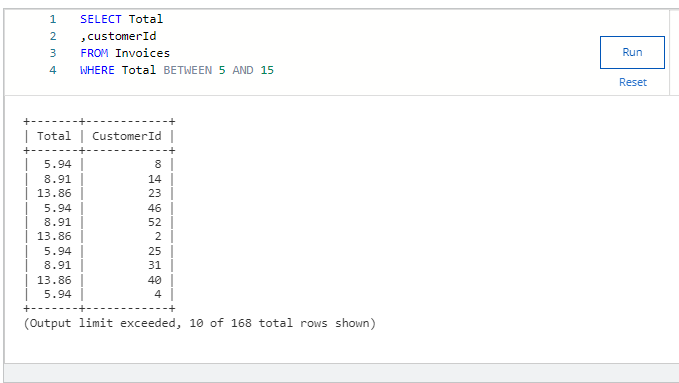
While the query in this example is limited to 10 records, running the query correctly will indicate how many total records there are – enter that number below.
Answer = 168
Run Query: Find all the customers from the following States: RJ, DF, AB, BC, CA, WA, NY.
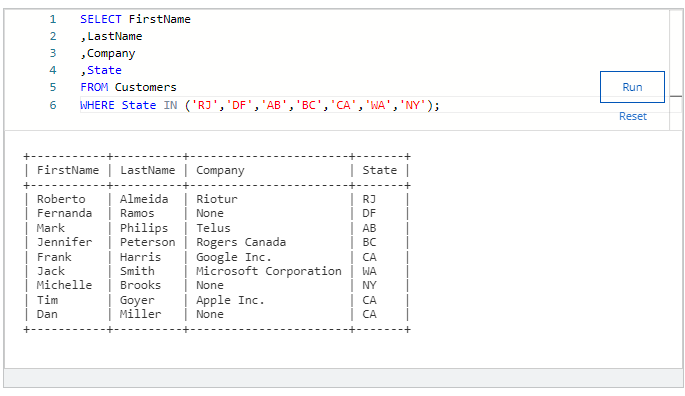
1 point
Microsoft Corp
Apple Inc.
Google Inc.
Rogers Canada
Answer : Microsoft Corp
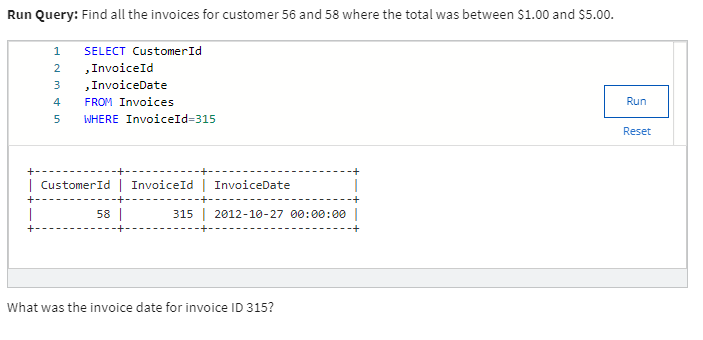
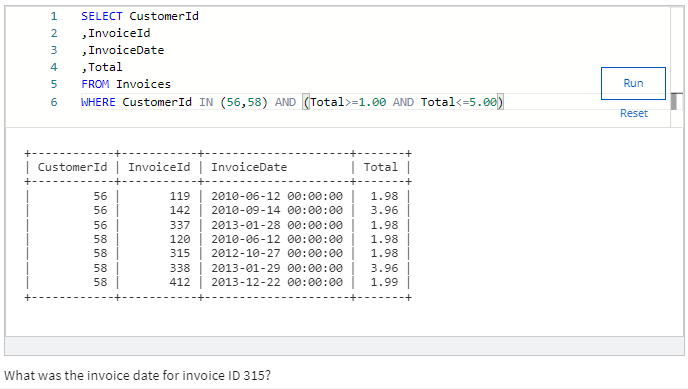
What was the invoice date for invoice ID 315?
Answer
10-27-2012
Run Query: Find all the tracks whose name starts with ‘All’.
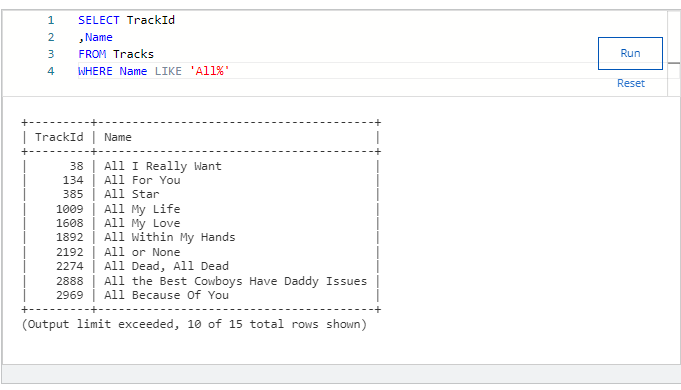
Answer = 15
Run Query: Find all the customer emails that start with “J” and are from gmail.com.
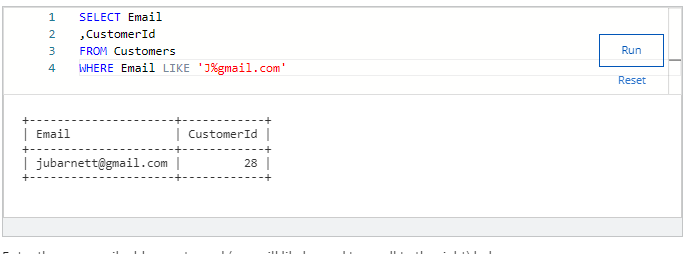
Enter the one email address returned (you will likely need to scroll to the right) below.
Answer :
jubarnett@gmail.com
Run Query: Find all the invoices from the billing city Brasília, Edmonton, and Vancouver and sort in descending order by invoice ID.
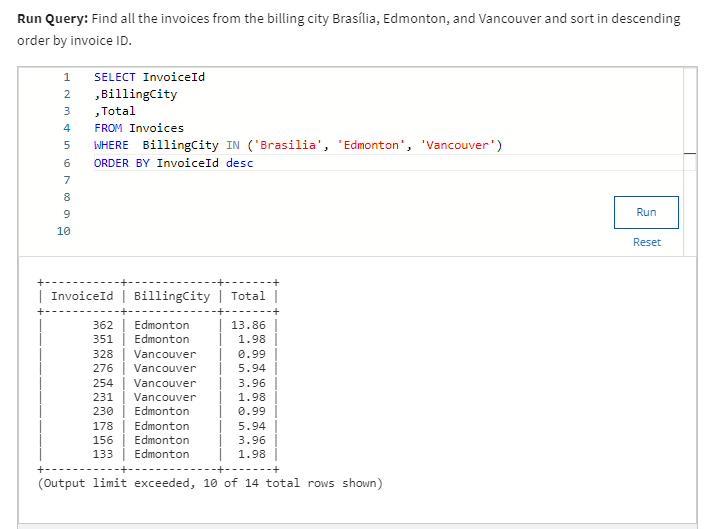
What is the total invoice amount of the first record returned? Enter the number below without a $ sign. Remember to sort in descending order to get the correct answer.
Answer : 13.86
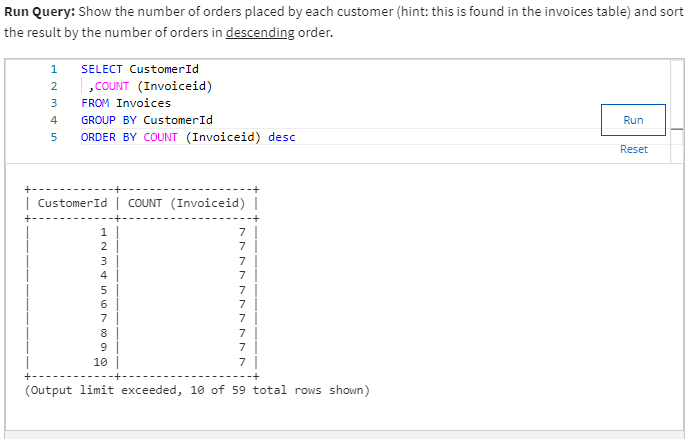
Run Query: Show the number of orders placed by each customer (hint: this is found in the invoices table) and sort the result by the number of orders in descending order.
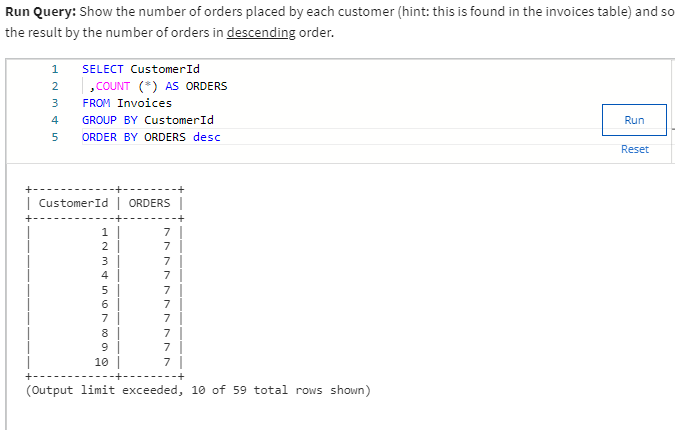
What is the number of items placed for the 8th person on this list? Enter that number below.
Answer =7
Different code for the same question
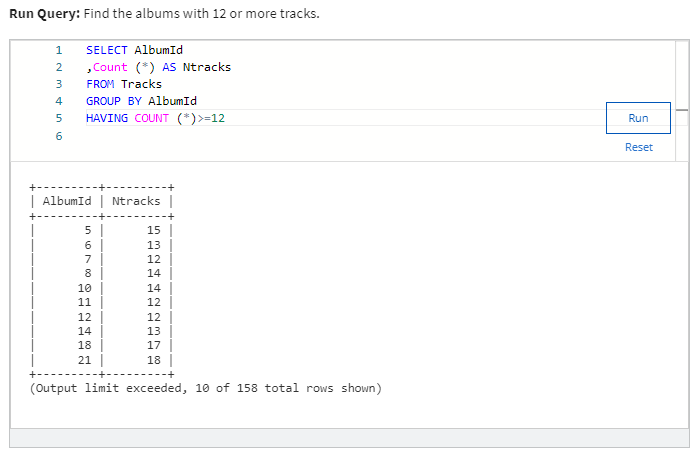
Run Query: Find the albums with 12 or more tracks.
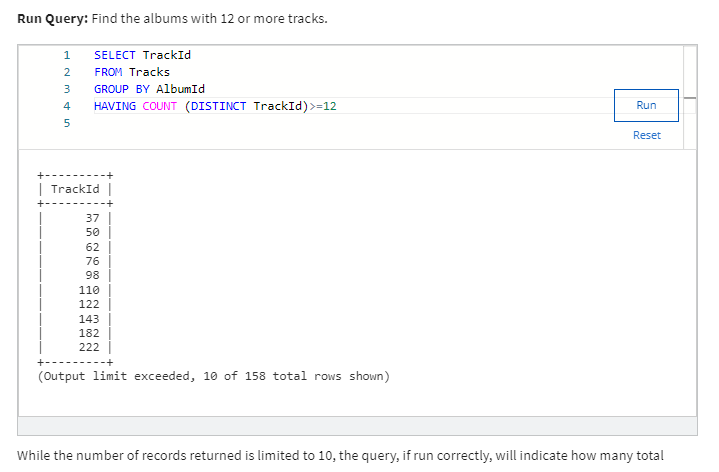
While the number of records returned is limited to 10, the query, if run correctly, will indicate how many total records there are. Enter that number below.
Answer : 158
Same question by different code
MODULE 2 Questions
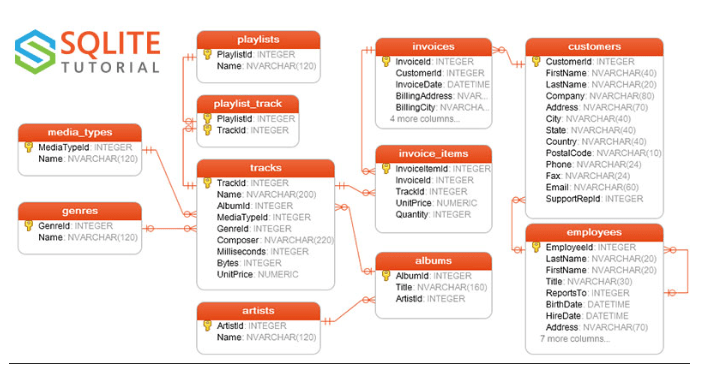
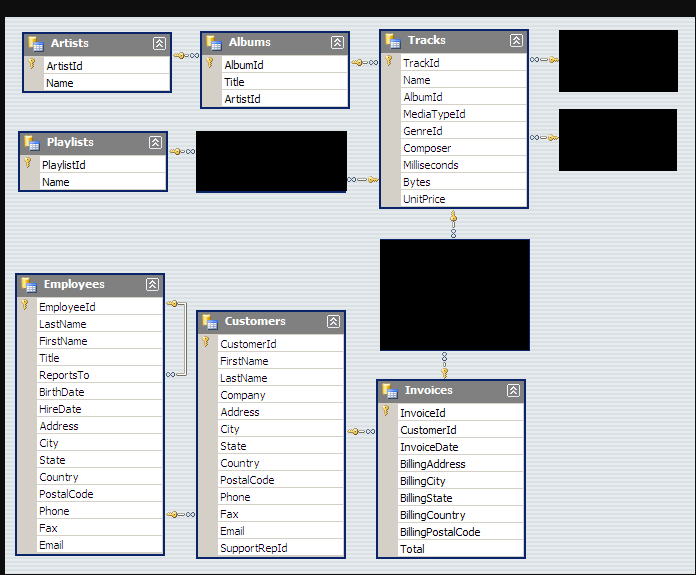
All of the questions in this quiz pull from the open source Chinook Database. Please refer to the ER Diagram below and familiarize yourself with the table and column names to write accurate queries and get the appropriate answers.
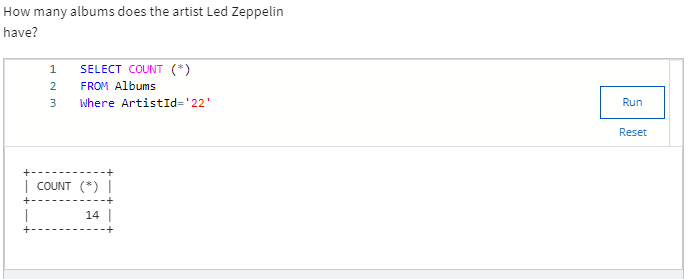
How many albums does the artist Led Zeppelin have?
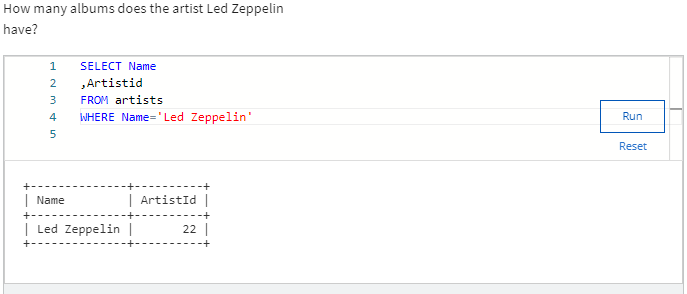
Now Artist Led Zeppelin ID is 22
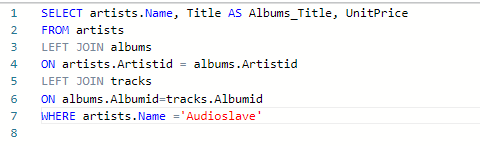
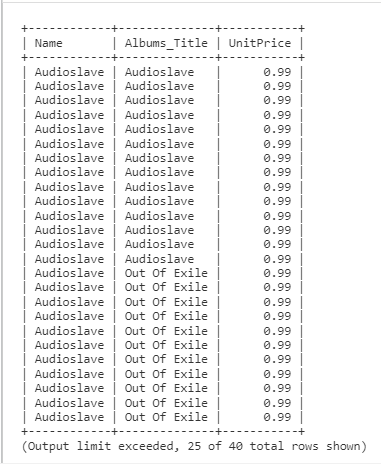
Create a list of album titles and the unit prices for the artist “Audioslave”.
Find the first and last name of any customer who does not have an invoice. Are there any customers returned from the query?
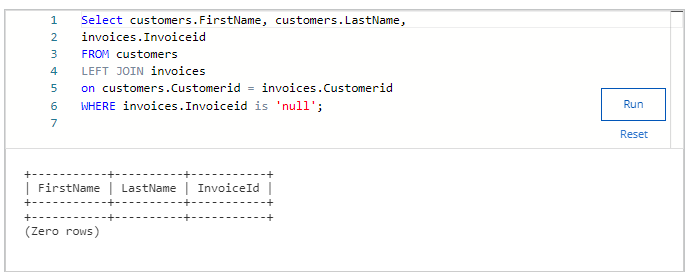
Find the total price for each album.
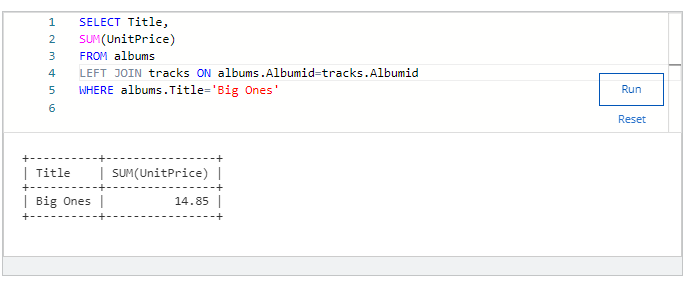
What is the total price for the album “Big Ones”?
ANS 14.85
How many records are created when you apply a Cartesian join to the invoice and invoice items table?


Answer 922880
Module 3 Coding Assignment
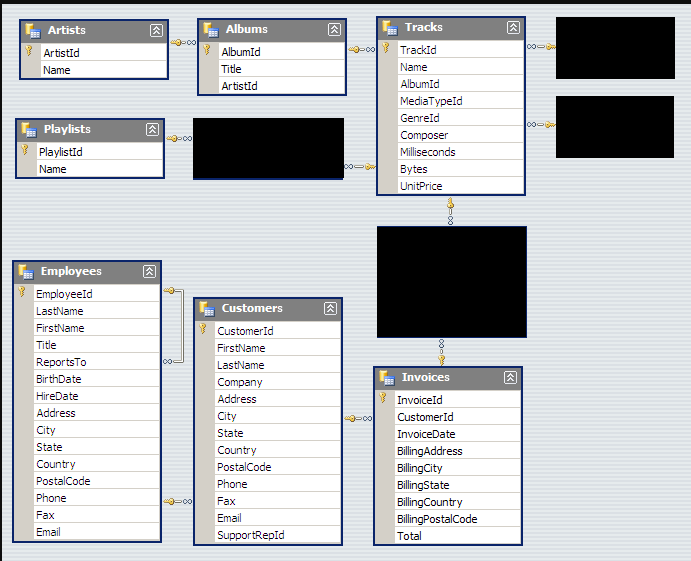
All of the questions in this quiz refer to the open source Chinook Database. Please familiarize yourself with the ER diagram in order to familiarize yourself with the table and column names in order to write accurate queries and get the appropriate answers.
Using a subquery, find the names of all the tracks for the album “Californication”.

8th track is
Porcelain
All of the questions in this quiz refer to the open source Chinook Database. Please familiarize yourself with the ER diagram in order to familiarize yourself with the table and column names in order to write accurate queries and get the appropriate answers.
Find the total number of invoices for each customer along with the customer’s full name, city and email.
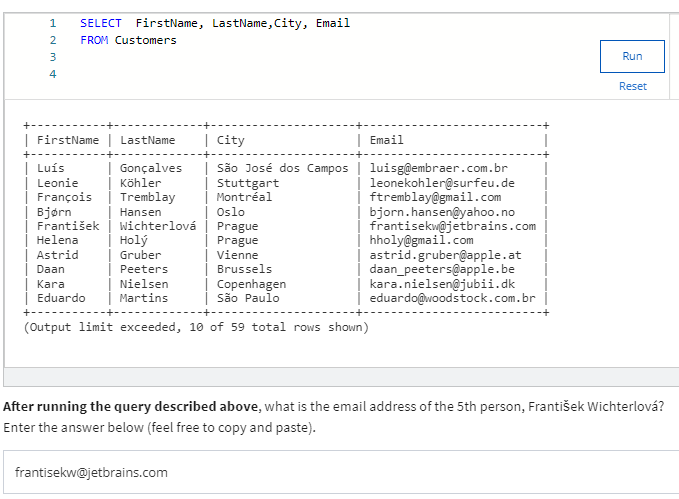
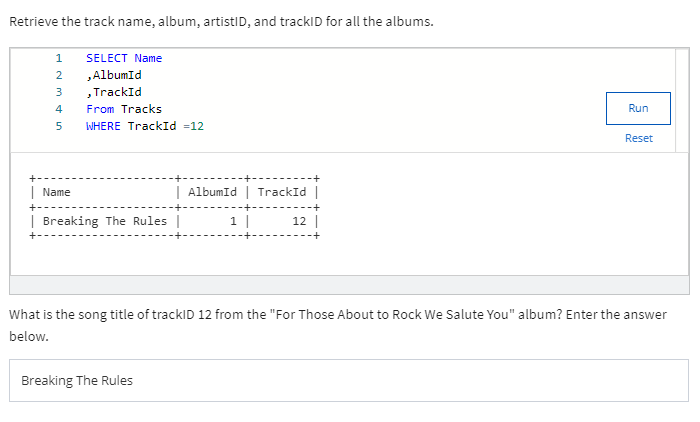
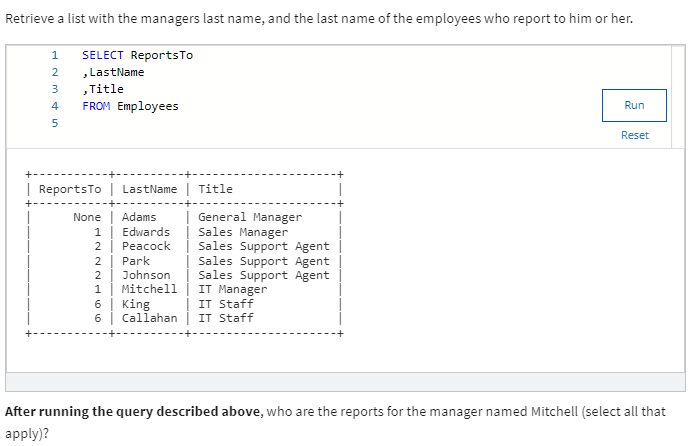
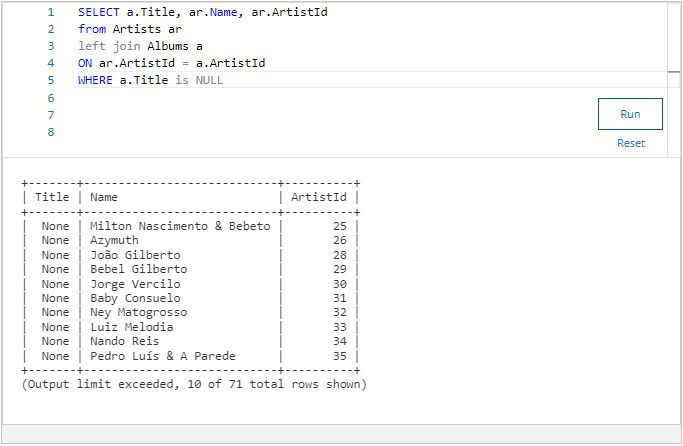
Gilberto
Use a UNION to create a list of all the employee’s and customer’s first names and last names ordered by the last name in descending order.
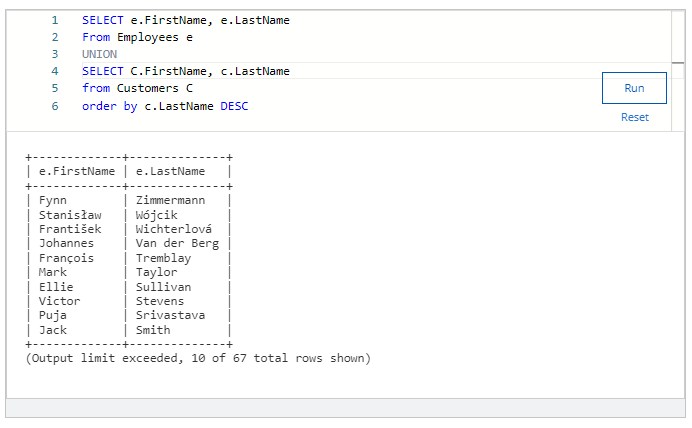
Taylor
See if there are any customers who have a different city listed in their billing city versus their customer city.
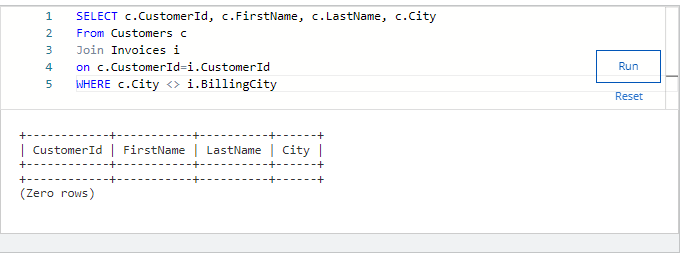
Answer
No customers have a different city listed in their billing city versus customer city.
Week 4 Quiz
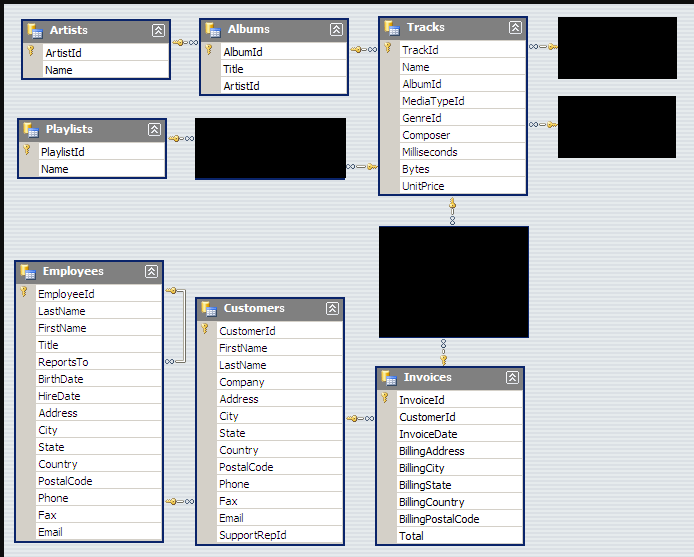
All of the questions in this quiz refer to the open source Chinook Database. Please familiarize yourself with the ER diagram in order to familiarize yourself with the table and column names in order to write accurate queries and get the appropriate answers.
Pull a list of customer ids with the customer’s full name, and address, along with combining their city and country together. Be sure to make a space in between these two and make it UPPER CASE. (e.g. LOS ANGELES USA)
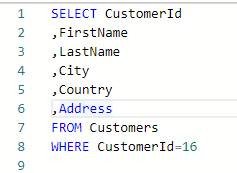

2.
Question 2
All of the questions in this quiz refer to the open source Chinook Database. Please familiarize yourself with the ER diagram in order to familiarize yourself with the table and column names in order to write accurate queries and get the appropriate answers.
Create a new employee user id by combining the first 4 letters of the employee’s first name with the first 2 letters of the employee’s last name. Make the new field lower case and pull each individual step to show your work.
SELECT FirstName,
LastName,
‘SUBSTR’ (FirstName, 1,4) AS A
‘SUBSTR'(LastName,1,2) AS B
‘SUBSTR'(FirstName,1,4)||’SUBSTR'(LastName,1,2) AS UserId
FROM Employees
What is the final result for Robert King?
RobeKi
All of the questions in this quiz refer to the open source Chinook Database. Please familiarize yourself with the ER diagram in order to familiarize yourself with the table and column names in order to write accurate queries and get the appropriate answers.
Show a list of employees who have worked for the company for 15 or more years using the current date function. Sort by lastname ascending.
What is the lastname of the last person on the list returned?
Peacock
All of the questions in this quiz refer to the open source Chinook Database. Please familiarize yourself with the ER diagram in order to familiarize yourself with the table and column names in order to write accurate queries and get the appropriate answers.
Profiling the Customers table, answer the following question.
SELECT COUNT(*)
FROM Customers
WHERE Phone IS NULL
FAX, Company, Phone , Postal code
All of the questions in this quiz refer to the open source Chinook Database. Please familiarize yourself with the ER diagram in order to familiarize yourself with the table and column names in order to write accurate queries and get the appropriate answers.
Find the cities with the most customers and rank in descending order.
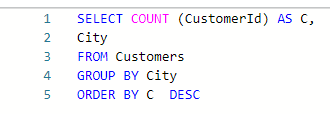
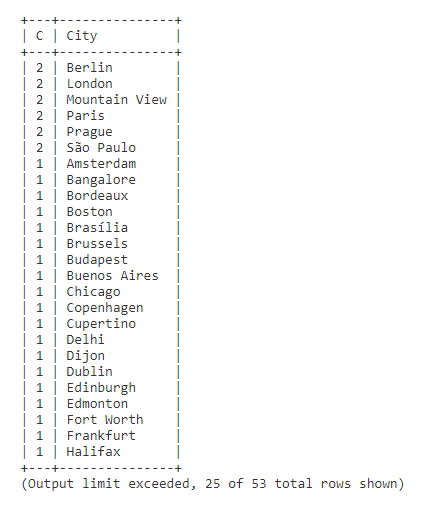
ANS
London, Sao Paulo, Moutain View
All of the questions in this quiz refer to the open source Chinook Database. Please familiarize yourself with the ER diagram in order to familiarize yourself with the table and column names in order to write accurate queries and get the appropriate answers.
Create a new customer invoice id by combining a customer’s invoice id with their first and last name while ordering your query in the following order: firstname, lastname, and invoiceID.
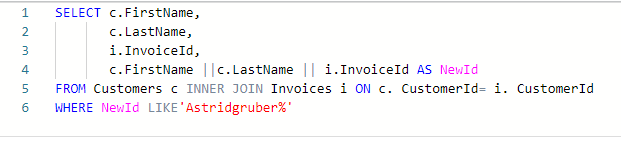
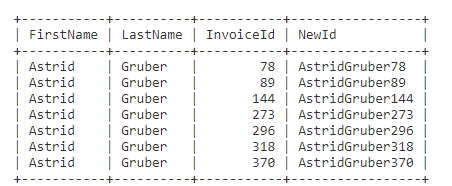
Ans
Select all of the correct “AstridGruber” entries that are returned in your results below. Select all that apply.
AstridGruber273
AstridGruber296
AstridGruber370
Spin-off of “Project: Design a store database”
Made using: Khan Academy Computer Science
Spin-off of “More complex queries with AND/OR”
Made using: Khan Academy Computer Science
CREATE TABLE exercise_logs
(id INTEGER PRIMARY KEY AUTOINCREMENT,
type TEXT,
minutes INTEGER,
calories INTEGER,
heart_rate INTEGER);
INSERT INTO exercise_logs(type, minutes, calories, heart_rate) VALUES (“Yoga”, 30, 100, 110);
INSERT INTO exercise_logs(type, minutes, calories, heart_rate) VALUES (“biking”, 10, 30, 105);
INSERT INTO exercise_logs(type, minutes, calories, heart_rate) VALUES (“dancing”, 15, 200, 120);
SELECT*FROM exercise_logs WHERE calories>100 ORDER BY calories;
/* AND */
SELECT * FROM exercise_logs WHERE calories >50 AND minutes <30;
/OR/
SELECT *FROM exercise_logs WHERE calories >50 OR heart_rate>100;
DATABASE SCHEMA
| exercise_logs3 rows |
|---|
| id (PK)INTEGER |
| typeTEXT |
| minutesINTEGER |
| caloriesINTEGER |
| heart_rateINTEGER |
QUERY RESULTS
| id | type | minutes | calories | heart_rate |
|---|---|---|---|---|
| 3 | dancing | 15 | 200 | 120 |
| id | type | minutes | calories | heart_rate |
|---|---|---|---|---|
| 3 | dancing | 15 | 200 | 120 |
| id | type | minutes | calories | heart_rate |
|---|---|---|---|---|
| 1 | Yoga | 30 | 100 | 110 |
| 2 | biking | 10 | 30 | 105 |
| 3 | dancing | 15 | 200 | 120 |
Spin-off of “Project: Data dig”
Made using: Khan Academy Computer Science
https://www.khanacademy.org/computer-programming/spin-off-of-project-data-dig/4910651633352704
Spin-off of “Project: Data dig”
Made using: Khan Academy Computer Science
https://www.khanacademy.org/computer-programming/spin-off-of-project-data-dig/4579792032153600
Spin-off of “Project: Data dig”
Made using: Khan Academy Computer Science
https://www.khanacademy.org/computer-programming/spin-off-of-project-data-dig/4878908956131328
SELECT Speed,
CASE
WHEN Speed > 50 THEN “below normal”
WHEN Speed > 75 THEN “normal”
WHEN Speed > 100 THEN “above normal”
ELSE “below speed”
END as “Speed_zone”
FROM pokemon;
| Speed | Speed_zone |
|---|---|
| 45 | below speed |
| 60 | below normal |
| 80 | below normal |
| 80 | below normal |
| 65 | below normal |
| 80 | below normal |
| 100 | below normal |
| 100 | below normal |
| 100 | below normal |
| 43 | below speed |
| 58 | below normal |
| 78 | below normal |
| 78 | below normal |
| 45 | below speed |
| 30 | below speed |
| 70 | below normal |
| 50 | below speed |
| 35 | below speed |
| 75 | below normal |
| 145 | below normal |
| 56 | below normal |
| 71 | below normal |
| 101 | below normal |
| 121 | below normal |
| 72 | below normal |
| 97 | below normal |
| 70 | below normal |
| 100 | below normal |
| 55 | below normal |
| 80 | below normal |
| 90 | below normal |
| 110 | below normal |
| 40 | below speed |
| 65 | below normal |
| 41 | below speed |
| 56 | below normal |
| 76 | below normal |
| 50 | below speed |
| 65 | below normal |
| 85 | below normal |
| 35 | below speed |
| 60 | below normal |
| 65 | below normal |
| 100 | below normal |
| 20 | below speed |
| 45 | below speed |
| 55 | below normal |
| 90 | below normal |
| 30 | below speed |
| 40 | below speed |
| 50 | below speed |
| 25 | below speed |
| 30 | below speed |
| 45 | below speed |
| 90 | below normal |
| 95 | below normal |
| 120 | below normal |
| 90 | below normal |
| 115 | below normal |
| 55 | below normal |
| 85 | below normal |
| 70 | below normal |
| 95 | below normal |
| 60 | below normal |
| 95 | below normal |
| 90 | below normal |
| 90 | below normal |
| 70 | below normal |
| 90 | below normal |
| 105 | below normal |
| 120 | below normal |
| 150 | below normal |
| 35 | below speed |
| 45 | below speed |
| 55 | below normal |
| 40 | below speed |
| 55 | below normal |
| 70 | below normal |
| 70 | below normal |
| 100 | below normal |
| 20 | below speed |
| 35 | below speed |
| 45 | below speed |
| 90 | below normal |
| 105 | below normal |
| 15 | below speed |
| 30 | below speed |
| 30 | below speed |
| 45 | below speed |
| 70 | below normal |
| 60 | below normal |
| 75 | below normal |
| 100 | below normal |
| 45 | below speed |
| 70 | below normal |
| 25 | below speed |
| 50 | below speed |
| 40 | below speed |
| 70 | below normal |
| 80 | below normal |
| 95 | below normal |
| 110 | below normal |
| 130 | below normal |
| 70 | below normal |
| 42 | below speed |
| 67 | below normal |
| 50 | below speed |
| 75 | below normal |
| 100 | below normal |
| 140 | below normal |
| 40 | below speed |
| 55 | below normal |
| 35 | below speed |
| 45 | below speed |
| 87 | below normal |
| 76 | below normal |
| 30 | below speed |
| 35 | below speed |
| 60 | below normal |
| 25 | below speed |
| 40 | below speed |
| 50 | below speed |
| 60 | below normal |
| 90 | below normal |
| 100 | below normal |
| 60 | below normal |
| 85 | below normal |
| 63 | below normal |
| 68 | below normal |
| 85 | below normal |
| 115 | below normal |
| 90 | below normal |
| 105 | below normal |
| 95 | below normal |
| 105 | below normal |
| 93 | below normal |
| 85 | below normal |
| 105 | below normal |
| 110 | below normal |
| 80 | below normal |
| 81 | below normal |
| 81 | below normal |
| 60 | below normal |
| 48 | below speed |
| 55 | below normal |
| 65 | below normal |
| 130 | below normal |
| 65 | below normal |
| 40 | below speed |
| 35 | below speed |
| 55 | below normal |
| 55 | below normal |
| 80 | below normal |
| 130 | below normal |
| 150 | below normal |
| 30 | below speed |
| 85 | below normal |
| 100 | below normal |
| 90 | below normal |
| 50 | below speed |
| 70 | below normal |
| 80 | below normal |
| 130 | below normal |
| 130 | below normal |
| 140 | below normal |
| 100 | below normal |
| 45 | below speed |
| 60 | below normal |
| 80 | below normal |
| 65 | below normal |
| 80 | below normal |
| 100 | below normal |
| 43 | below speed |
| 58 | below normal |
| 78 | below normal |
| 20 | below speed |
| 90 | below normal |
| 50 | below speed |
| 70 | below normal |
| 55 | below normal |
| 85 | below normal |
| 30 | below speed |
| 40 | below speed |
| 130 | below normal |
| 67 | below normal |
| 67 | below normal |
| 60 | below normal |
| 15 | below speed |
| 15 | below speed |
| 20 | below speed |
| 40 | below speed |
| 70 | below normal |
| 95 | below normal |
| 35 | below speed |
| 45 | below speed |
| 55 | below normal |
| 45 | below speed |
| 50 | below speed |
| 40 | below speed |
| 50 | below speed |
| 30 | below speed |
| 70 | below normal |
| 50 | below speed |
| 80 | below normal |
| 110 | below normal |
| 85 | below normal |
| 30 | below speed |
| 30 | below speed |
| 95 | below normal |
| 15 | below speed |
| 35 | below speed |
| 110 | below normal |
| 65 | below normal |
| 91 | below normal |
| 30 | below speed |
| 85 | below normal |
| 48 | below speed |
| 33 | below speed |
| 85 | below normal |
| 15 | below speed |
| 40 | below speed |
| 45 | below speed |
| 85 | below normal |
| 30 | below speed |
| 30 | below speed |
| 30 | below speed |
| 45 | below speed |
| 85 | below normal |
| 65 | below normal |
| 75 | below normal |
| 5 | below speed |
| 85 | below normal |
| 75 | below normal |
| 115 | below normal |
| 40 | below speed |
| 55 | below normal |
| 20 | below speed |
| 30 | below speed |
| 50 | below speed |
| 50 | below speed |
| 35 | below speed |
| 65 | below normal |
| 45 | below speed |
| 75 | below normal |
| 70 | below normal |
| 70 | below normal |
| 65 | below normal |
| 95 | below normal |
| 115 | below normal |
| 85 | below normal |
| 40 | below speed |
| 50 | below speed |
| 60 | below normal |
| 85 | below normal |
| 75 | below normal |
| 35 | below speed |
| 70 | below normal |
| 65 | below normal |
| 95 | below normal |
| 83 | below normal |
| 100 | below normal |
| 55 | below normal |
| 115 | below normal |
| 100 | below normal |
| 85 | below normal |
| 41 | below speed |
| 51 | below normal |
| 61 | below normal |
| 71 | below normal |
| 110 | below normal |
| 90 | below normal |
| 100 | below normal |
| 70 | below normal |
| 95 | below normal |
| 120 | below normal |
| 145 | below normal |
| 45 | below speed |
| 55 | below normal |
| 80 | below normal |
| 100 | below normal |
| 40 | below speed |
| 50 | below speed |
| 60 | below normal |
| 70 | below normal |
| 35 | below speed |
| 70 | below normal |
| 60 | below normal |
| 100 | below normal |
| 20 | below speed |
| 15 | below speed |
| 65 | below normal |
| 15 | below speed |
| 65 | below normal |
| 30 | below speed |
| 50 | below speed |
| 70 | below normal |
| 30 | below speed |
| 60 | below normal |
| 80 | below normal |
| 85 | below normal |
| 125 | below normal |
| 85 | below normal |
| 65 | below normal |
| 40 | below speed |
| 50 | below speed |
| 80 | below normal |
| 100 | below normal |
| 65 | below normal |
| 60 | below normal |
| 35 | below speed |
| 70 | below normal |
| 30 | below speed |
| 90 | below normal |
| 100 | below normal |
| 40 | below speed |
| 160 | below normal |
| 40 | below speed |
| 28 | below speed |
| 48 | below speed |
| 68 | below normal |
| 25 | below speed |
| 50 | below speed |
| 20 | below speed |
| 30 | below speed |
| 50 | below speed |
| 70 | below normal |
| 50 | below speed |
| 20 | below speed |
| 50 | below speed |
| 50 | below speed |
| 30 | below speed |
| 40 | below speed |
| 50 | below speed |
| 50 | below speed |
| 60 | below normal |
| 80 | below normal |
| 100 | below normal |
| 65 | below normal |
| 105 | below normal |
| 135 | below normal |
| 95 | below normal |
| 95 | below normal |
| 85 | below normal |
| 85 | below normal |
| 65 | below normal |
| 40 | below speed |
| 55 | below normal |
| 65 | below normal |
| 95 | below normal |
| 105 | below normal |
| 60 | below normal |
| 60 | below normal |
| 35 | below speed |
| 40 | below speed |
| 20 | below speed |
| 20 | below speed |
| 60 | below normal |
| 80 | below normal |
| 60 | below normal |
| 10 | below speed |
| 70 | below normal |
| 100 | below normal |
| 35 | below speed |
| 55 | below normal |
| 50 | below speed |
| 80 | below normal |
| 80 | below normal |
| 90 | below normal |
| 65 | below normal |
| 70 | below normal |
| 70 | below normal |
| 60 | below normal |
| 60 | below normal |
| 35 | below speed |
| 55 | below normal |
| 55 | below normal |
| 75 | below normal |
| 23 | below speed |
| 43 | below speed |
| 75 | below normal |
| 45 | below speed |
| 80 | below normal |
| 81 | below normal |
| 70 | below normal |
| 40 | below speed |
| 45 | below speed |
| 65 | below normal |
| 75 | below normal |
| 25 | below speed |
| 25 | below speed |
| 51 | below normal |
| 65 | below normal |
| 75 | below normal |
| 115 | below normal |
| 23 | below speed |
| 50 | below speed |
| 80 | below normal |
| 100 | below normal |
| 25 | below speed |
| 45 | below speed |
| 65 | below normal |
| 32 | below speed |
| 52 | below normal |
| 52 | below normal |
| 55 | below normal |
| 97 | below normal |
| 50 | below speed |
| 50 | below speed |
| 100 | below normal |
| 120 | below normal |
| 30 | below speed |
| 50 | below speed |
| 70 | below normal |
| 110 | below normal |
| 50 | below speed |
| 50 | below speed |
| 50 | below speed |
| 110 | below normal |
| 110 | below normal |
| 110 | below normal |
| 110 | below normal |
| 90 | below normal |
| 90 | below normal |
| 90 | below normal |
| 90 | below normal |
| 95 | below normal |
| 115 | below normal |
| 100 | below normal |
| 150 | below normal |
| 150 | below normal |
| 90 | below normal |
| 180 | below normal |
| 31 | below speed |
| 36 | below speed |
| 56 | below normal |
| 61 | below normal |
| 81 | below normal |
| 108 | below normal |
| 40 | below speed |
| 50 | below speed |
| 60 | below normal |
| 60 | below normal |
| 80 | below normal |
| 100 | below normal |
| 31 | below speed |
| 71 | below normal |
| 25 | below speed |
| 65 | below normal |
| 45 | below speed |
| 60 | below normal |
| 70 | below normal |
| 55 | below normal |
| 90 | below normal |
| 58 | below normal |
| 58 | below normal |
| 30 | below speed |
| 30 | below speed |
| 36 | below speed |
| 36 | below speed |
| 36 | below speed |
| 36 | below speed |
| 66 | below normal |
| 70 | below normal |
| 40 | below speed |
| 95 | below normal |
| 85 | below normal |
| 115 | below normal |
| 35 | below speed |
| 85 | below normal |
| 34 | below speed |
| 39 | below speed |
| 115 | below normal |
| 70 | below normal |
| 80 | below normal |
| 85 | below normal |
| 105 | below normal |
| 135 | below normal |
| 105 | below normal |
| 71 | below normal |
| 85 | below normal |
| 112 | below normal |
| 45 | below speed |
| 74 | below normal |
| 84 | below normal |
| 23 | below speed |
| 33 | below speed |
| 10 | below speed |
| 60 | below normal |
| 30 | below speed |
| 91 | below normal |
| 35 | below speed |
| 42 | below speed |
| 82 | below normal |
| 102 | below normal |
| 92 | below normal |
| 5 | below speed |
| 60 | below normal |
| 90 | below normal |
| 112 | below normal |
| 32 | below speed |
| 47 | below speed |
| 65 | below normal |
| 95 | below normal |
| 50 | below speed |
| 85 | below normal |
| 46 | below speed |
| 66 | below normal |
| 91 | below normal |
| 50 | below speed |
| 40 | below speed |
| 60 | below normal |
| 30 | below speed |
| 125 | below normal |
| 60 | below normal |
| 50 | below speed |
| 40 | below speed |
| 50 | below speed |
| 95 | below normal |
| 83 | below normal |
| 80 | below normal |
| 95 | below normal |
| 95 | below normal |
| 65 | below normal |
| 95 | below normal |
| 80 | below normal |
| 90 | below normal |
| 80 | below normal |
| 110 | below normal |
| 40 | below speed |
| 45 | below speed |
| 110 | below normal |
| 91 | below normal |
| 86 | below normal |
| 86 | below normal |
| 86 | below normal |
| 86 | below normal |
| 86 | below normal |
| 95 | below normal |
| 80 | below normal |
| 115 | below normal |
| 90 | below normal |
| 100 | below normal |
| 77 | below normal |
| 100 | below normal |
| 90 | below normal |
| 90 | below normal |
| 85 | below normal |
| 80 | below normal |
| 100 | below normal |
| 125 | below normal |
| 100 | below normal |
| 127 | below normal |
| 120 | below normal |
| 100 | below normal |
| 63 | below normal |
| 83 | below normal |
| 113 | below normal |
| 45 | below speed |
| 55 | below normal |
| 65 | below normal |
| 45 | below speed |
| 60 | below normal |
| 70 | below normal |
| 42 | below speed |
| 77 | below normal |
| 55 | below normal |
| 60 | below normal |
| 80 | below normal |
| 66 | below normal |
| 106 | below normal |
| 64 | below normal |
| 101 | below normal |
| 64 | below normal |
| 101 | below normal |
| 64 | below normal |
| 101 | below normal |
| 24 | below speed |
| 29 | below speed |
| 43 | below speed |
| 65 | below normal |
| 93 | below normal |
| 76 | below normal |
| 116 | below normal |
| 15 | below speed |
| 20 | below speed |
| 25 | below speed |
| 72 | below normal |
| 114 | below normal |
| 68 | below normal |
| 88 | below normal |
| 50 | below speed |
| 50 | below speed |
| 35 | below speed |
| 40 | below speed |
| 45 | below speed |
| 64 | below normal |
| 69 | below normal |
| 74 | below normal |
| 45 | below speed |
| 85 | below normal |
| 42 | below speed |
| 42 | below speed |
| 92 | below normal |
| 57 | below normal |
| 47 | below speed |
| 112 | below normal |
| 66 | below normal |
| 116 | below normal |
| 30 | below speed |
| 90 | below normal |
| 98 | below normal |
| 65 | below normal |
| 74 | below normal |
| 92 | below normal |
| 50 | below speed |
| 95 | below normal |
| 55 | below normal |
| 60 | below normal |
| 55 | below normal |
| 45 | below speed |
| 48 | below speed |
| 58 | below normal |
| 97 | below normal |
| 30 | below speed |
| 30 | below speed |
| 22 | below speed |
| 32 | below speed |
| 70 | below normal |
| 110 | below normal |
| 65 | below normal |
| 75 | below normal |
| 65 | below normal |
| 105 | below normal |
| 75 | below normal |
| 115 | below normal |
| 45 | below speed |
| 55 | below normal |
| 65 | below normal |
| 20 | below speed |
| 30 | below speed |
| 30 | below speed |
| 55 | below normal |
| 98 | below normal |
| 44 | below speed |
| 59 | below normal |
| 79 | below normal |
| 75 | below normal |
| 95 | below normal |
| 103 | below normal |
| 60 | below normal |
| 20 | below speed |
| 15 | below speed |
| 30 | below speed |
| 40 | below speed |
| 60 | below normal |
| 65 | below normal |
| 65 | below normal |
| 108 | below normal |
| 10 | below speed |
| 20 | below speed |
| 30 | below speed |
| 50 | below speed |
| 90 | below normal |
| 60 | below normal |
| 40 | below speed |
| 50 | below speed |
| 30 | below speed |
| 40 | below speed |
| 20 | below speed |
| 55 | below normal |
| 80 | below normal |
| 57 | below normal |
| 67 | below normal |
| 97 | below normal |
| 40 | below speed |
| 50 | below speed |
| 105 | below normal |
| 25 | below speed |
| 145 | below normal |
| 32 | below speed |
| 65 | below normal |
| 105 | below normal |
| 48 | below speed |
| 35 | below speed |
| 55 | below normal |
| 60 | below normal |
| 70 | below normal |
| 55 | below normal |
| 60 | below normal |
| 80 | below normal |
| 60 | below normal |
| 80 | below normal |
| 65 | below normal |
| 109 | below normal |
| 38 | below speed |
| 58 | below normal |
| 98 | below normal |
| 60 | below normal |
| 100 | below normal |
| 108 | below normal |
| 108 | below normal |
| 108 | below normal |
| 111 | below normal |
| 121 | below normal |
| 111 | below normal |
| 101 | below normal |
| 90 | below normal |
| 90 | below normal |
| 101 | below normal |
| 91 | below normal |
| 95 | below normal |
| 95 | below normal |
| 95 | below normal |
| 108 | below normal |
| 108 | below normal |
| 90 | below normal |
| 128 | below normal |
| 99 | below normal |
| 38 | below speed |
| 57 | below normal |
| 64 | below normal |
| 60 | below normal |
| 73 | below normal |
| 104 | below normal |
| 71 | below normal |
| 97 | below normal |
| 122 | below normal |
| 57 | below normal |
| 78 | below normal |
| 62 | below normal |
| 84 | below normal |
| 126 | below normal |
| 35 | below speed |
| 29 | below speed |
| 89 | below normal |
| 72 | below normal |
| 106 | below normal |
| 42 | below speed |
| 52 | below normal |
| 75 | below normal |
| 52 | below normal |
| 68 | below normal |
| 43 | below speed |
| 58 | below normal |
| 102 | below normal |
| 68 | below normal |
| 104 | below normal |
| 104 | below normal |
| 28 | below speed |
| 35 | below speed |
| 60 | below normal |
| 60 | below normal |
| 23 | below speed |
| 29 | below speed |
| 49 | below speed |
| 72 | below normal |
| 45 | below speed |
| 73 | below normal |
| 50 | below speed |
| 68 | below normal |
| 30 | below speed |
| 44 | below speed |
| 44 | below speed |
| 59 | below normal |
| 70 | below normal |
| 109 | below normal |
| 48 | below speed |
| 71 | below normal |
| 46 | below speed |
| 58 | below normal |
| 60 | below normal |
| 118 | below normal |
| 101 | below normal |
| 50 | below speed |
| 40 | below speed |
| 60 | below normal |
| 80 | below normal |
| 75 | below normal |
| 38 | below speed |
| 56 | below normal |
| 51 | below normal |
| 56 | below normal |
| 46 | below speed |
| 41 | below speed |
| 84 | below normal |
| 99 | below normal |
| 69 | below normal |
| 54 | below normal |
| 28 | below speed |
| 28 | below speed |
| 55 | below normal |
| 123 | below normal |
| 99 | below normal |
| 99 | below normal |
| 95 | below normal |
| 50 | below speed |
| 110 | below normal |
| 70 | below normal |
| 80 | below normal |
| 70 | below normal |
CREATE TABLE clothes (
id INTEGER PRIMARY KEY AUTOINCREMENT,
type TEXT,
design TEXT);
INSERT INTO clothes (type, design)
VALUES (“dress”, “pink polka dots”);
INSERT INTO clothes (type, design)
VALUES (“pants”, “rainbow tie-dye”);
INSERT INTO clothes (type, design)
VALUES (“blazer”, “black sequin”);
SELECT * FROM clothes;
ALTER TABLE clothes ADD price TEXT default “unknown”;
SELECT * FROM clothes;
DATABASE SCHEMA
| clothes3 rows |
|---|
| id (PK)INTEGER |
| typeTEXT |
| designTEXT |
| priceTEXT |
QUERY RESULTS
| id | type | design |
|---|---|---|
| 1 | dress | pink polka dots |
| 2 | pants | rainbow tie-dye |
| 3 | blazer | black sequin |
| id | type | design | price |
|---|---|---|---|
| 1 | dress | pink polka dots | unknown |
| 2 | pants | rainbow tie-dye | unknown |
| 3 | blazer | black sequin | unknown |
Coursera SQL for Data Science project
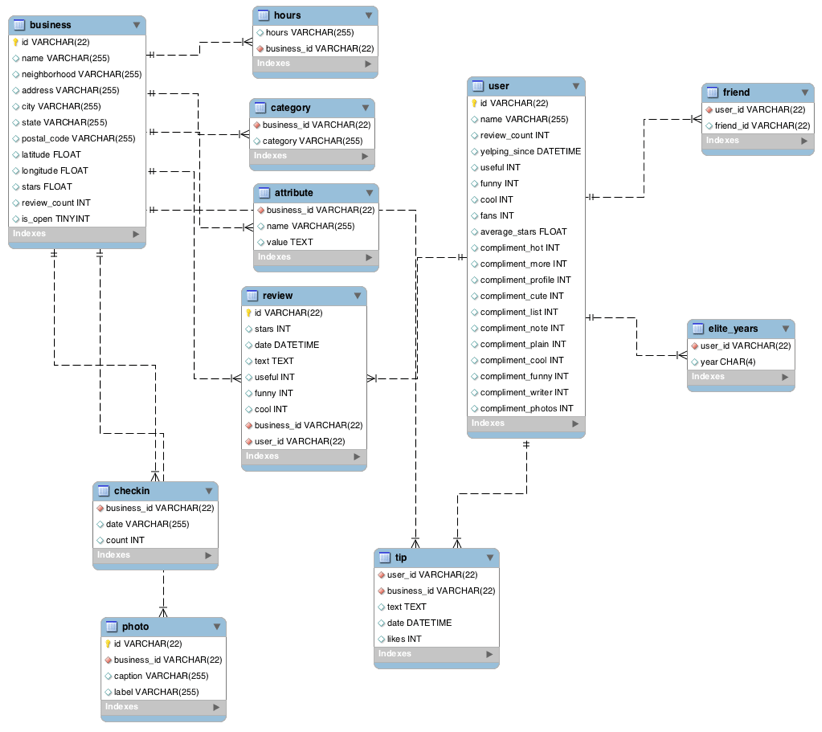
Yelp Dataset ER Diagram
less
The entity-relationship (ER) diagram below, should help familiarize you with the design of the Yelp Dataset provided for this peer review activity.
Data Scientist Role Play: Profiling and Analyzing the Yelp Dataset Coursera Worksheet
This is a 2-part assignment. In the first part, you are asked a series of questions that
will help you profile and understand the data just like a data scientist would. For this
first part of the assignment, you will be assessed both on the correctness of your
findings, as well as the code you used to arrive at your answer. You will be graded on
how easy your code is to read, so remember to use proper formatting and comments where
necessary.
In the second part of the assignment, you are asked to come up with your own inferences
and analysis of the data for a particular research question you want to answer. You will be
required to prepare the dataset for the analysis you choose to do. As with the first part,
you will be graded, in part, on how easy your code is to read, so use proper formatting
and comments to illustrate and communicate your intent as required.
For both parts of this assignment, use this “worksheet.” It provides all the questions
you are being asked, and your job will be to transfer your answers and SQL coding where
indicated into this worksheet so that your peers can review your work. You should be able
to use any Text Editor (Windows Notepad, Apple TextEdit, Notepad ++, Sublime Text, etc.)
to copy and paste your answers. If you are going to use Word or some other page layout
application, just be careful to make sure your answers and code are lined appropriately.
In this case, you may want to save as a PDF to ensure your formatting remains intact
for you reviewer.
SELECT COUNT(*)
FROM ‘Attribute table;
Attribute table = 10000
Business table = 10000
category table = 10000
checkin table = 10000
elite_years table = 10000
friend table = 10000
hours table = 10000
photo table = 10000
review table = 10000
tip table = 10000
user table = 10000
/*
Find the total number of distinct records for each of the keys listed below:*/
SELECT COUNT (DISTINCT(id))
FROM business;
| COUNT (DISTINCT(id)) |
+———————-+
| 10000 |
Answer Business = 10000
SELECT COUNT (DISTINCT business_id)
FROM hours;
+——————————+
| COUNT (DISTINCT business_id) |
+——————————+
| 1562
Answer Hours = 1562
SELECT COUNT (DISTINCT business_id)
FROM category;
+——————————+
| COUNT (DISTINCT business_id) |
+——————————+
| 2643 |
+——————————
Answer Category =2643
SELECT COUNT (DISTINCT(business_id))
FROM attribute;
+——————————-+
| COUNT (DISTINCT(business_id)) |
+——————————-+
| 1115 |
+——————————-
Answer Attribute = 1115
SELECT COUNT (DISTINCT id)
FROM review;
+———————+
| COUNT (DISTINCT id) |
+———————+
| 10000 |
+———————
Answer Review = 10000
SELECT COUNT (DISTINCT business_id)
FROM checkin;
+——————————+
| COUNT (DISTINCT business_id) |
+——————————+
| 493 |
+——————————+
Answer Checkin = 493
SELECT COUNT (DISTINCT id)
FROM photo;
+———————+
| COUNT (DISTINCT id) |
+———————+
| 10000 |
+———————
Answer Photo =10000
SELECT COUNT (DISTINCT user_id)
FROM tip;
+————————–+
| COUNT (DISTINCT user_id) |
+————————–+
| 537
Answer Tip = 537
SELECT COUNT (DISTINCT id)
FROM user;
+———————+
| COUNT (DISTINCT id) |
+———————+
| 10000 |
+———————+
Answer User = 10000
SELECT COUNT (DISTINCT user_id)
FROM friend;
+————————–+
| COUNT (DISTINCT user_id) |
+————————–+
| 11 |
+————————–
Answer Friend = 11
SELECT COUNT (DISTINCT user_id)
FROM elite_years;
+————————–+
| COUNT (DISTINCT user_id) |
+————————–+
| 2780 |
+————————–
/*
Are there any columns with null values in the Users table? Indicate “yes,” or “no.”
Answer: “no”
SQL code used to arrive at answer:*/
SELECT id
,name
,review_count
,cool
,yelping_since
,useful
,funny
,fans
,average_stars
FROM user
WHERE id IS NULL OR
name IS NULL OR
review_count IS NULL ;
+—-+——+————–+——+—————+——–+——-+——+—————+
| id | name | review_count | cool | yelping_since | useful | funny | fans | average_stars |
+—-+——+————–+——+—————+——–+——-+——+—————+
+—-+——+————–+——+—————+——–+——-+——+—————+
Answer = no
/* Find the minimum, maximum, and average value for the following fields:*/
SELECT AVG (stars)
FROM review;
+————-+
| AVG (stars) |
+————-+
| 3.7082 |
+————-+
Average = 3,7082
i. Table: Review, Column: Stars
min: 1 max: 5 avg: 3.7082
SELECT MAX (stars)
FROM review;
+————-+
| MAX (stars) |
+————-+
| 5 |
+————-
Answer Max=5
SELECT Min (stars)
FROM review;
+————-+
| Min (stars) |
+————-+
| 1 |
+————-
Answer Min =1
SELECT Min (stars)
FROM business;
+————-+
| Min (stars) |
+————-+
| 1.0 |
Answer Business Min =1
SELECT Max (stars)
FROM business;
+————-+
| Max (stars) |
+————-+
| 5.0 |
+————-
+————-+
| MAX (stars) |
+————-+
| 5.0 |
+————-+
Answer Business Max=5
SELECT avg(stars)
FROM business;
+————+
| avg(stars) |
+————+
| 3.6549 |
+————+
Answer Business Average =3.6549
ii. Table: Business, Column: Stars
min: 1 max: 5 avg: 3.6549
SELECT min(likes)
FROM tip;
+————+
| min(likes) |
+————+
| 0 |
+————
Answer min of likes =0
SELECT max(likes)
FROM tip;
+————+
| max(likes) |
+————+
| 2 |
+————+
Answer max of likes = 2
SELECT avg(likes)
FROM tip;
————+
| avg(likes) |
+————+
| 0.0144 |
+————+
Answer avg of likes = 0.0144
iii. Table: Tip, Column: Likes
min: 0 max: 2 avg: 0.0144
SELECT min(count)
FROM checkin;
12
SELECT min(count)
FROM checkin;
+————+
| min(count) |
+————+
| 1 |
+————
Answer of count min =1
SELECT max(count)
FROM checkin;
+————+
| max(count) |
+————+
| 53 |
+————+
Answer of max of checkin is 53
SELECT avg(count)
FROM checkin;
+————+
| avg(count) |
+————+
| 1.9414 |
+————
Answer of avg of checkin = 1,9414
iv. Table: Checkin, Column: Count
min: 1 max: 53 avg: 1.9414
SELECT min(review_count)
FROM user;
——————-+
| min(review_count) |
+——————-+
| 0 |
+——————-
The answer of min of users =0
SELECT max(review_count)
FROM user;
max(review_count) |
+——————-+
| 2000 |
Answer of max of review count = 2000
SELECT avg(review_count)
FROM user;
+——————-+
| avg(review_count) |
+——————-+
| 24.2995 |
+——————-+
Answer average of review count = 24,2995
v. Table: User, Column: Review_count
min: 0 max: 2000 avg: 24.2995
/* List the cities with the most reviews in descending order:
SQL code used to arrive at the answer: */
SELECT city
, SUM (review_count) AS reviews
FROM business
GROUP BY city
ORDER BY reviews DESC
Copy and Paste the Result Below:
+—————–+———+
| city | reviews |
+—————–+———+
| Las Vegas | 82854 |
| Phoenix | 34503 |
| Toronto | 24113 |
| Scottsdale | 20614 |
| Charlotte | 12523 |
| Henderson | 10871 |
| Tempe | 10504 |
| Pittsburgh | 9798 |
| Montréal | 9448 |
| Chandler | 8112 |
| Mesa | 6875 |
| Gilbert | 6380 |
| Cleveland | 5593 |
| Madison | 5265 |
| Glendale | 4406 |
| Mississauga | 3814 |
| Edinburgh | 2792 |
| Peoria | 2624 |
| North Las Vegas | 2438 |
| Markham | 2352 |
| Champaign | 2029 |
| Stuttgart | 1849 |
| Surprise | 1520 |
| Lakewood | 1465 |
| Goodyear | 1155 |
+—————–+———+
(Output limit exceeded, 25 of 362 total rows shown)
/* Find the distribution of star ratings to the business in the following cities:
i. Avon
SQL code used to arrive at the answer:*/
SELECT (stars) AS star_rating
,city
FROM business
GROUP BY city
ORDER BY COUNT (star_rating)
Star Rating Count
0 0
1 0
1.5 1
2 0
2.5 2
3 0
3.5 3
4 2
4.5 1
5 1
/*ii. Beachwood
SQL code used to arrive at the answer:*/
SELECT stars,
SUM(review_count) AS count
FROM business
WHERE city == ‘Beachwood’
GROUP BY stars
Star Rating Count
0 0
1 0
1.5 0
2 1
2.5 1
3 2
3.5 2
4 1
4.5 2
5 5
/* Find the top 3 users based on their total number of reviews:
SQL code used to arrive at answer:*/
SELECT id
,name
,review_count
FROM user
ORDER BY review_count DESC
LIMIT 3 ;
Copy and Paste the Result Below:
+————————+——–+————–+
| id | name | review_count |
+————————+——–+————–+
| -G7Zkl1wIWBBmD0KRy_sCw | Gerald | 2000 |
| -3s52C4zL_DHRK0ULG6qtg | Sara | 1629 |
| -8lbUNlXVSoXqaRRiHiSNg | Yuri | 1339 |
+————————+——–+————–
/*8. Does posing more reviews correlate with more fans?
Yes, but you should also consider how long they have been yelping. Their fan base grows
as they have more reviews and longer-running Yelp accounts.
Please explain your findings and interpretation of the results:*/
SELECT id
,name
,review_count
,fans
,yelping_since
,useful
FROM user
ORDER BY fans DESC;
+————————+———–+————–+——+———————+——–+
| id | name | review_count | fans | yelping_since | useful |
+————————+———–+————–+——+———————+——–+
| -9I98YbNQnLdAmcYfb324Q | Amy | 609 | 503 | 2007-07-19 00:00:00 | 3226 |
| -8EnCioUmDygAbsYZmTeRQ | Mimi | 968 | 497 | 2011-03-30 00:00:00 | 257 |
| –2vR0DIsmQ6WfcSzKWigw | Harald | 1153 | 311 | 2012-11-27 00:00:00 | 122921 |
| -G7Zkl1wIWBBmD0KRy_sCw | Gerald | 2000 | 253 | 2012-12-16 00:00:00 | 17524 |
| -0IiMAZI2SsQ7VmyzJjokQ | Christine | 930 | 173 | 2009-07-08 00:00:00 | 4834 |
| -g3XIcCb2b-BD0QBCcq2Sw | Lisa | 813 | 159 | 2009-10-05 00:00:00 | 48 |
| -9bbDysuiWeo2VShFJJtcw | Cat | 377 | 133 | 2009-02-05 00:00:00 | 1062 |
| -FZBTkAZEXoP7CYvRV2ZwQ | William | 1215 | 126 | 2015-02-19 00:00:00 | 9363 |
| -9da1xk7zgnnfO1uTVYGkA | Fran | 862 | 124 | 2012-04-05 00:00:00 | 9851 |
| -lh59ko3dxChBSZ9U7LfUw | Lissa | 834 | 120 | 2007-08-14 00:00:00 | 455 |
| -B-QEUESGWHPE_889WJaeg | Mark | 861 | 115 | 2009-05-31 00:00:00 | 4008 |
| -DmqnhW4Omr3YhmnigaqHg | Tiffany | 408 | 111 | 2008-10-28 00:00:00 | 1366 |
| -cv9PPT7IHux7XUc9dOpkg | bernice | 255 | 105 | 2007-08-29 00:00:00 | 120 |
| -DFCC64NXgqrxlO8aLU5rg | Roanna | 1039 | 104 | 2006-03-28 00:00:00 | 2995 |
| -IgKkE8JvYNWeGu8ze4P8Q | Angela | 694 | 101 | 2010-10-01 00:00:00 | 158 |
| -K2Tcgh2EKX6e6HqqIrBIQ | .Hon | 1246 | 101 | 2006-07-19 00:00:00 | 7850 |
| -4viTt9UC44lWCFJwleMNQ | Ben | 307 | 96 | 2007-03-10 00:00:00 | 1180 |
| -3i9bhfvrM3F1wsC9XIB8g | Linda | 584 | 89 | 2005-08-07 00:00:00 | 3177 |
| -kLVfaJytOJY2-QdQoCcNQ | Christina | 842 | 85 | 2012-10-08 00:00:00 | 158 |
| -ePh4Prox7ZXnEBNGKyUEA | Jessica | 220 | 84 | 2009-01-12 00:00:00 | 2161 |
| -4BEUkLvHQntN6qPfKJP2w | Greg | 408 | 81 | 2008-02-16 00:00:00 | 820 |
| -C-l8EHSLXtZZVfUAUhsPA | Nieves | 178 | 80 | 2013-07-08 00:00:00 | 1091 |
| -dw8f7FLaUmWR7bfJ_Yf0w | Sui | 754 | 78 | 2009-09-07 00:00:00 | 9 |
| -8lbUNlXVSoXqaRRiHiSNg | Yuri | 1339 | 76 | 2008-01-03 00:00:00 | 1166 |
| -0zEEaDFIjABtPQni0XlHA | Nicole | 161 | 73 | 2009-04-30 00:00:00 | 13 |
+————————+———–+————–+——+———————+——–+
(Output limit exceeded, 25 of 10000 total rows shown)
/*9. Are there more reviews with the word “love” or with the word “hate” in them?
Answer: love has 1780, while hate only has 232 🙂 “Love triumphs”
SQL code used to arrive at answer:*/
SELECT COUNT (*)
FROM review
WHERE text LIKE ‘%love%’ ;
+———–+
| COUNT (*) |
+———–+
| 1780 |
+———–+
SELECT COUNT (*)
FROM review
WHERE text LIKE ‘%hate%’ ;
+———–+
| COUNT (*) |
+———–+
| 232 |
+———–
= 1780 = 232
Love is more
/*10. Find the top 10 users with the most fans:
SQL code used to arrive at answer:*/
SELECT id
,name
,fans
,yelping_since
FROM user
ORDER BY fans DESC
LIMIT 10;
Copy and Paste the Result Below:
+————————+———–+——+———————+
| id | name | fans | yelping_since |
+————————+———–+——+———————+
| -9I98YbNQnLdAmcYfb324Q | Amy | 503 | 2007-07-19 00:00:00 |
| -8EnCioUmDygAbsYZmTeRQ | Mimi | 497 | 2011-03-30 00:00:00 |
| –2vR0DIsmQ6WfcSzKWigw | Harald | 311 | 2012-11-27 00:00:00 |
| -G7Zkl1wIWBBmD0KRy_sCw | Gerald | 253 | 2012-12-16 00:00:00 |
| -0IiMAZI2SsQ7VmyzJjokQ | Christine | 173 | 2009-07-08 00:00:00 |
| -g3XIcCb2b-BD0QBCcq2Sw | Lisa | 159 | 2009-10-05 00:00:00 |
| -9bbDysuiWeo2VShFJJtcw | Cat | 133 | 2009-02-05 00:00:00 |
| -FZBTkAZEXoP7CYvRV2ZwQ | William | 126 | 2015-02-19 00:00:00 |
| -9da1xk7zgnnfO1uTVYGkA | Fran | 124 | 2012-04-05 00:00:00 |
| -lh59ko3dxChBSZ9U7LfUw | Lissa | 120 | 2007-08-14 00:00:00 |
+————————+———–+——+———————+
/*9. Are there more reviews with the word “love” or with the word “hate” in them?
Answer: love has 1780, while hate only has 232 🙂 “Love triumphs”*/
SQL code used to arrive at answer:
SQL code used to arrive at answer:*/
SELECT COUNT (*)
FROM review
WHERE text LIKE ‘%love%’ ;
+———–+
| COUNT (*) |
+———–+
| 1780 |
+———–+
SELECT COUNT (*)
FROM review
WHERE text LIKE ‘%hate%’ ;
+———–+
| COUNT (*) |
+———–+
| 232 |
+———–
= 1780 = 232
Love is more
= 1780 = 232
/*10. Find the top 10 users with the most fans:
SQL code used to arrive at answer:*/
SELECT id,
name,
fans
FROM user
ORDER BY fans DESC
LIMIT 10
Copy and Paste the Result Below:
+————————+———–+——+
| id | name | fans |
+————————+———–+——+
| -9I98YbNQnLdAmcYfb324Q | Amy | 503 |
| -8EnCioUmDygAbsYZmTeRQ | Mimi | 497 |
| –2vR0DIsmQ6WfcSzKWigw | Harald | 311 |
| -G7Zkl1wIWBBmD0KRy_sCw | Gerald | 253 |
| -0IiMAZI2SsQ7VmyzJjokQ | Christine | 173 |
| -g3XIcCb2b-BD0QBCcq2Sw | Lisa | 159 |
| -9bbDysuiWeo2VShFJJtcw | Cat | 133 |
| -FZBTkAZEXoP7CYvRV2ZwQ | William | 126 |
| -9da1xk7zgnnfO1uTVYGkA | Fran | 124 |
| -lh59ko3dxChBSZ9U7LfUw | Lissa | 120 |
/*11. Is there a strong correlation between having a high number of fans and being listed
as “useful” or “funny?”
Yes, see the interpretation.
SQL code used to arrive at answer: */
SELECT name
,fans
,useful
,funny
,review_count
,yelping_since
,cool
FROM user
ORDER BY fans DESC ;
+———–+——+——–+——–+————–+———————+——–+
| name | fans | useful | funny | review_count | yelping_since | cool |
+———–+——+——–+——–+————–+———————+——–+
| Amy | 503 | 3226 | 2554 | 609 | 2007-07-19 00:00:00 | 2751 |
| Mimi | 497 | 257 | 138 | 968 | 2011-03-30 00:00:00 | 159 |
| Harald | 311 | 122921 | 122419 | 1153 | 2012-11-27 00:00:00 | 122890 |
| Gerald | 253 | 17524 | 2324 | 2000 | 2012-12-16 00:00:00 | 15008 |
| Christine | 173 | 4834 | 6646 | 930 | 2009-07-08 00:00:00 | 4321 |
| Lisa | 159 | 48 | 13 | 813 | 2009-10-05 00:00:00 | 6 |
| Cat | 133 | 1062 | 672 | 377 | 2009-02-05 00:00:00 | 1076 |
| William | 126 | 9363 | 9361 | 1215 | 2015-02-19 00:00:00 | 9370 |
| Fran | 124 | 9851 | 7606 | 862 | 2012-04-05 00:00:00 | 9344 |
| Lissa | 120 | 455 | 150 | 834 | 2007-08-14 00:00:00 | 342 |
| Mark | 115 | 4008 | 570 | 861 | 2009-05-31 00:00:00 | 2765 |
| Tiffany | 111 | 1366 | 984 | 408 | 2008-10-28 00:00:00 | 1279 |
| bernice | 105 | 120 | 112 | 255 | 2007-08-29 00:00:00 | 109 |
| Roanna | 104 | 2995 | 1188 | 1039 | 2006-03-28 00:00:00 | 636 |
| Angela | 101 | 158 | 164 | 694 | 2010-10-01 00:00:00 | 105 |
| .Hon | 101 | 7850 | 5851 | 1246 | 2006-07-19 00:00:00 | 5104 |
| Ben | 96 | 1180 | 1155 | 307 | 2007-03-10 00:00:00 | 1143 |
| Linda | 89 | 3177 | 2736 | 584 | 2005-08-07 00:00:00 | 3019 |
| Christina | 85 | 158 | 34 | 842 | 2012-10-08 00:00:00 | 102 |
| Jessica | 84 | 2161 | 2091 | 220 | 2009-01-12 00:00:00 | 2067 |
| Greg | 81 | 820 | 753 | 408 | 2008-02-16 00:00:00 | 746 |
| Nieves | 80 | 1091 | 774 | 178 | 2013-07-08 00:00:00 | 940 |
| Sui | 78 | 9 | 18 | 754 | 2009-09-07 00:00:00 | 2 |
| Yuri | 76 | 1166 | 220 | 1339 | 2008-01-03 00:00:00 | 561 |
| Nicole | 73 | 13 | 10 | 161 | 2009-04-30 00:00:00 | 6 |
+———–+——+——–+——–+————–+———————+——–+
/*Please explain your findings and interpretation of the results:
Yes, but number three Harald does appear to be a significant anomaly.
More “helpful” “cool” and “funny” reviews get more fans for the other users,
but also in conjunction with the review count and length of time they have
been yelping
Part 2: Inferences and Analysis
- Pick one city and category of your choice and group the businesses in that city
or category by their overall star rating. Compare the businesses with 2-3 stars to
the businesses with 4-5 stars and answer the following questions. Include your code.
i. Do the two groups you chose to analyze have a different distribution of hours?
The 4-5 star group seems to have shorter hours then the 2-3 star group.
Please note the query returned only three businesses so not a great
sample size.
ii. Do the two groups you chose to analyze have a different number of reviews?
Yes and no, one of the 4-5 star group has a lot more reviews but then the other
4-5 star group has close to the same number of reviews as the 2-3 star group
iii. Are you able to infer anything from the location data provided between these two
groups? Explain.
No, every business is in a different zip-code.
SQL code used for analysis:
SELECT business_id
,category
FROM category
GROUP BY category
ORDER BY category=’%shopping%’;
+————————+————————+
| business_id | category |
+————————+————————+
| aNYlGDgtWjm6mmlQgmThkg | ATV Rentals/Tours |
| onf4yC67bqd3pczANjeiGA | Accessories |
| z8_dxxWDhT4uYLwRfDk-Zw | Accountants |
| OYVHaHAK6jphuq-Tu5OG-Q | Active Life |
| ZLT4EvjLUCkw7Vqq7LXdoQ | Acupuncture |
| zbeOniywMsbIuZmAaHoXVQ | Adult |
| Lj6tX9QOf-uxLNOZ8n97rQ | Adult Entertainment |
| sLEMDdMXdHE_5rOBjsNOhg | Advertising |
| LKjTkkEofaczTk4Du2HjFw | Air Duct Cleaning |
| i2KvYbYQyjoPwUke4lI2-A | Airlines |
| AKvX–qsEbh6jKJnGg0OWw | Airport Lounges |
| LVTJoOohLqrMwc1AhGQyVA | Airport Shuttles |
| qmKhpVcpY_yGeh2_D2LHeQ | Airport Terminals |
| OeQUmob9q5sbEixK2-Tozw | Airports |
| UhGzuKKUUmhUDvR4EtFqNA | Allergists |
| VC3UgPqdJOakhPdlwOD9ow | Amateur Sports Teams |
| 2lcK3d4K7FU6O8wXdWzOmA | American (New) |
| 6_JqE5olfHoz1T_m96G85g | American (Traditional) |
| 5MbnCl55_ARfILMU_n2T8g | Amusement Parks |
| cnTRpe5uBp82RdrfW9QShg | Animal Shelters |
| tPHYc6rKiA0zrXOcLaX7kQ | Antiques |
| 2RWjqLU44aptc5EIju_ocg | Apartments |
| hljT5HMTeq3mlrtNpBnhTA | Appliances |
| IETo39FTLKPa5-7QYBC4lw | Appliances & Repair |
| kFtuYklkAIlmYw8RZAieGw | Appraisal Services |
+————————+————————+
SELECT city
,id
,stars
FROM business
GROUP BY stars
ORDER BY 2 OR 3;
+————–+————————+——-+
| city | id | stars |
+————–+————————+——-+
| Montreal | 35jzGQtpvAoAbxNrjYYCEg | 1.0 |
| West Mifflin | 37pHO_A0Zsx46X7zUEkvoQ | 1.5 |
| Tempe | 382Kmrk5rdFSMlL7iJG_qg | 2.0 |
| Phoenix | 38tScZkvRLoa5h-wNPyjkw | 2.5 |
| Cleveland | 38Q56Fgl0OF1iLqq_Wwivg | 3.0 |
| Henderson | 38rXDufRtJeGSMP6ducaCw | 3.5 |
| Ingliston | 38s4jUZBkei3Gy-U5mtEJA | 4.0 |
| Charlotte | 38OrCpBBQG-dzhxfXrFQWQ | 4.5 |
| Stuttgart | 38cVxRnCm9cYY_di-qaUQg | 5.0 |
+————–+————————+——-+
SELECT city
,id
,stars
FROM business
WHERE stars BETWEEN 2 AND 3;
+——————+————————+——-+
| city | id | stars |
+——————+————————+——-+
| Richmond Hill | –6MefnULPED_I942VcFNA | 3.0 |
| Tempe | –9QQLMTbFzLJ_oT-ON3Xw | 3.0 |
| Pittsburgh | –cjBEbXMI2obtaRHNSFrA | 3.0 |
| Las Vegas | –DdmeR16TRb3LsjG0ejrQ | 3.0 |
| Charlotte | –KCl2FvVQpvjzmZSPyviA | 3.0 |
| Scottsdale | –KQsXc-clkO7oHRqGzSzg | 3.0 |
| Brunswick | –Ni3oJ4VOqfOEu7Sj2Vzg | 2.0 |
| Phoenix | –orEUqwTzz5QKbmyYbAWw | 2.5 |
| North York | –q6datkI-f0EoVheXNEeQ | 3.0 |
| Highland Heights | –S62v0QgkqQaVUhFnNHrw | 2.0 |
| Henderson | –TcDRzRIxhvHM4DSgEuMA | 2.0 |
| Chandler | –ttCFj_csKJhxnaMRNuiw | 3.0 |
| Indian Trail | –U98MNlDym2cLn36BBPgQ | 3.0 |
| Scottsdale | -01XupAWZEXbdNbxNg5mEg | 3.0 |
| Rantoul | -05uZNVbb8DhFweTEOoDVg | 2.0 |
| Toronto | -0aOudcaAyac0VJbMX-L1g | 3.0 |
| Las Vegas | -0BxAGlIk5DJAGVkpqBXxg | 3.0 |
| North York | -0CTrPQNiSyClxhdO4HSDQ | 2.0 |
| Toronto | -0d-BfFSU0bwLcnMaGRxYw | 3.0 |
| Markham | -0DET7VdEQOJVJ_v6klEug | 3.0 |
| Homestead | -0dWjxaPKrXAn8urSnkSLA | 3.0 |
| Madison | -0Hj1hb_XW6ybWq2M7QhGA | 3.0 |
| Glendale | -0jz6c3C6i7RG7Ag22K-Pg | 2.5 |
| Richmond Hill | -0KMvRFwDWdVBeTpT11iHw | 2.5 |
| Toronto | -0NhdsDJsdarxyDPR523ZQ | 3.0 |
+——————+————————+——-+
(Output limit exceeded, 25 of 2852 total rows shown)
SELECT city
,id
,stars
FROM business
WHERE stars BETWEEN 4 AND 5;
+————–+————————+——-+
| city | id | stars |
+————–+————————+——-+
| Huntersville | –7zmmkVg-IMGaXbuVd0SQ | 4.0 |
| Gilbert | –8LPVSo5i0Oo61X01sV9A | 4.5 |
| Las Vegas | –9e1ONYQuAa-CB_Rrw7Tw | 4.0 |
| Tempe | –ab39IjZR_xUf81WyTyHg | 4.0 |
| Pittsburgh | –cgVkbWTiga3OYTkymKqA | 5.0 |
| Charlotte | –cZ6Hhc9F7VkKXxHMVZSQ | 4.0 |
| Charlotte | –EX4rRznJrltyn-34Jz1w | 4.0 |
| Henderson | –FBCX-N37CMYDfs790Bnw | 4.0 |
| Phoenix | –g-a85VwrdZJNf0R95GcQ | 4.5 |
| Canonsburg | –GM_ORV2cYS-h38DSaCLw | 4.0 |
| Bay Village | –i1tTcggBi4cPkd-h5hDg | 4.5 |
| Toronto | –kinfHwmtdjz03g8B8z8Q | 4.5 |
| Henderson | –lpHMVmkCuji0ZrpHtXEA | 5.0 |
| Edinburgh | –LY7PrnEegglB7vnPCjQw | 4.0 |
| Phoenix | –phjqoPSPa8sLmUVNby9w | 4.0 |
| Las Vegas | –q7kSBRb0vWC8lSkXFByA | 4.0 |
| Chandler | –qvQS4MigHPykD2GV0-zw | 4.0 |
| Phoenix | –Rsj71PBe31h5YljVseKA | 4.0 |
| Huntersville | –sdH6tFAdEs7j4Msr7nPA | 5.0 |
| Stuttgart | –W4kqPWwXFycuqejFANmw | 4.5 |
| Pittsburgh | –wIGbLEhlpl_UeAIyDmZQ | 5.0 |
| Las Vegas | –WsruI0IGEoeRmkErU5Gg | 5.0 |
| Las Vegas | –Y7NhBKzLTbNliMUX_wfg | 5.0 |
| Las Vegas | –z7PM8AGaJP0aBmGMY7RA | 4.5 |
| Phoenix | -000aQFeK6tqVLndf7xORg | 5.0 |
+————–+————————+——-+
(Output limit exceeded, 25 of 5008 total rows shown)
- Group business based on the ones that are open and the ones that are closed. What
differences can you find between the ones that are still open and the ones that are
closed? List at least two differences and the SQL code you used to arrive at your
answer.
i. Difference 1:
The businesses that are open tend to have more reviews than ones that
are closed on average.
Open: AVG(review_count) = 31.757
Closed: AVG(review_count0 = 23.198
/*ii. Difference 2:
The average star rating is higher for businesses that are open than
businesses that are closed.
Open: AVG(stars) = 3.679
Closed: AVG(stars) = 3.520
SQL code used for analysis: */
SELECT COUNT (DISTINCT (id))
,AVG (review_count)
FROM business;
+———————–+——————–+
| COUNT (DISTINCT (id)) | AVG (review_count) |
+———————–+——————–+
| 10000 | 30.4561 |
+———————–+——————–
SELECT COUNT (DISTINCT (id))
,AVG (review_count)
,SUM(review_count)
FROM business;
+———————–+——————–+——————-+
| COUNT (DISTINCT (id)) | AVG (review_count) | SUM(review_count) |
+———————–+——————–+——————-+
| 10000 | 30.4561 | 304561 |
+———————–+——————–+——————-+
SELECT COUNT (DISTINCT (id))
,AVG (review_count)
,SUM(review_count)
,AVG (stars)
FROM business;
+———————–+——————–+——————-+————-+
| COUNT (DISTINCT (id)) | AVG (review_count) | SUM(review_count) | AVG (stars) |
+———————–+——————–+——————-+————-+
| 10000 | 30.4561 | 304561 | 3.6549 |
+———————–+——————–+——————-+————-
SELECT COUNT (DISTINCT (id))
,AVG (review_count)
,SUM(review_count)
,AVG (stars)
,is_open
FROM business;
+———————–+——————–+——————-+————-+———+
| COUNT (DISTINCT (id)) | AVG (review_count) | SUM(review_count) | AVG (stars) | is_open |
+———————–+——-|————+——————-+————-+———+
| 10000 | |30.4561 | 304561 | 3.6549 | 1 |
+———————–+——————–+——————-+————-+———+
SELECT COUNT (DISTINCT (id))
,AVG (review_count)
,SUM(review_count)
,AVG (stars)
,is_open
FROM business
GROUP BY is_open;
+———————–+——————–+——————-+—————+———+
| COUNT (DISTINCT (id)) | AVG (review_count) | SUM(review_count) | AVG (stars) | is_open |
+———————–+——————–+——————-+—————+———+
| 1520 | 23.1980263158 | 35261 | 3.52039473684 | 0 |
| 8480 | 31.7570754717 | 269300 | 3.67900943396 | 1 |
+———————–+——————–+——————-+—————+———
Answer review count 35261 < 269300 so The businesses that are open tend to have more reviews
- For this last part of your analysis, you are going to choose the type of analysis you
want to conduct on the Yelp dataset and are going to prepare the data for analysis.
Ideas for analysis include: Parsing out keywords and business attributes for sentiment
analysis, clustering businesses to find commonalities or anomalies between them,
predicting the overall star rating for a business, predicting the number of fans a
user will have, and so on. These are just a few examples to get you started, so feel
free to be creative and come up with your own problem you want to solve. Provide
answers, in-line, to all of the following:
i. Indicate the type of analysis you chose to do:
Predicting whether a business will stay open or close. We wish not to explicitly
examine the text of the reviews, but this would be an interesting analysis.
ii. Write 1-2 brief paragraphs on the type of data you will need for your analysis
and why you chose that data:
To better help businesses understand the importance of different factors which
will help their business stay open. Some data that may be important; number of
reviews, star rating of business, hours open, and of course location location
location. We will gather the latitude and longitude as well as city, state,
postal_code, and address to make processing easier later on. Categories and
attributes will be used to better distinguish between different types of
businesses. is_open will determine which business is open and which business
have closed (not hours) but permanently.
iii. Output of your finished dataset:
SELECT id
,is_open
,stars
,review_count
FROM business
GROUP BY review_count
ORDER BY review_count DESC
LIMIT 20 ;
+————————+———+——-+————–+
| id | is_open | stars | review_count |
+————————+———+——-+————–+
| 2weQS-RnoOBhb1KsHKyoSQ | 1 | 3.5 | 3873 |
| 0W4lkclzZThpx3V65bVgig | 1 | 4.0 | 1757 |
| 0FUtlsQrJI7LhqDPxLumEw | 1 | 4.0 | 1549 |
| 2iTsRqUsPGRH1li1WVRvKQ | 1 | 4.5 | 1410 |
| –9e1ONYQuAa-CB_Rrw7Tw | 1 | 4.0 | 1389 |
| -ed0Yc9on37RoIoG2ZgxBA | 1 | 4.0 | 1252 |
| 0NmTwqYEQiKErDv4a55obg | 1 | 4.0 | 1116 |
| 0AQnRQw34IQW9-1gJkYnMA | 1 | 3.0 | 1084 |
| -U7tvCtaraTQ9b0zBhpBMA | 1 | 2.5 | 961 |
| -6tvduBzjLI1ISfs3F_qTg | 1 | 4.0 | 902 |
| 364hhL5st0LV16UcBHRJ3A | 1 | 4.5 | 864 |
| -FLnsWAa4AGEW4NgE8Fqew | 1 | 3.5 | 823 |
| 2sx52lDoiEtef7xgPCaoBw | 1 | 4.5 | 821 |
| 0_aeYE2-VbsZts_UpILgDw | 1 | 4.0 | 786 |
| 0ldxjei8v4q95fApIei3Lg | 1 | 4.0 | 785 |
| -av1lZI1JDY_RZN2eTMnWg | 1 | 3.5 | 778 |
| 1ZnVfS-qP19upP_fwOhZsA | 1 | 4.0 | 768 |
| 0q_BHpxbikVtPRRLRu-U0g | 1 | 4.5 | 758 |
| 1d6c6Q2j2jwVzBfX_dLHlg | 1 | 4.0 | 726 |
| -Eu04UHRqmGGyvYRDY8-tg | 1 | 4.5 | 723 |
+————————+———+——-+————–+
SELECT id
,is_open
,stars
,review_count
FROM business
GROUP BY is_open
ORDER BY review_count DESC
LIMIT 20 ;
+————————+———+——-+————–+
| id | is_open | stars | review_count |
+————————+———+——-+————–+
| 38tScZkvRLoa5h-wNPyjkw | 1 | 2.5 | 25 |
| 38k_heLKR2J5P7JKV2AonQ | 0 | 3.5 | 19 |
+————————+———+——-+————–+
Answer is open has more reviews then the closed.
SELECT id
,review_count
,yelping_since
,useful
,funny
,cool
FROM user ;
————————+————–+———————+——–+——–+——–+
| id | review_count | yelping_since | useful | funny | cool |
+————————+————–+———————+——–+——–+——–+
| —1lKK3aKOuomHnwAkAow | 245 | 2007-06-04 00:00:00 | 67 | 22 | 9 |
| —94vtJ_5o_nikEs6hUjg | 2 | 2016-05-27 00:00:00 | 0 | 0 | 0 |
| —cu1hq55BP9DWVXXKHZg | 57 | 2009-04-18 00:00:00 | 34 | 14 | 0 |
| —fhiwiwBYrvqhpXgcWDQ | 8 | 2011-04-20 00:00:00 | 2 | 3 | 1 |
| —PLwSf5gKdIoVnyRHgBA | 2 | 2015-07-31 00:00:00 | 1 | 0 | 0 |
| —udAKDsn0yQXmzbWQNSw | 43 | 2014-07-12 00:00:00 | 1 | 0 | 0 |
| –0kuuLmuYBe3Rmu0Iycww | 26 | 2010-03-08 00:00:00 | 10 | 2 | 0 |
| –0RtXvcOIE4XbErYca6Rw | 2 | 2013-05-30 00:00:00 | 0 | 0 | 0 |
| –0sXNBv6IizZXuV-nl0Aw | 1 | 2013-01-09 00:00:00 | 0 | 0 | 0 |
| –0WZ5gklOfbUIodJuKfaQ | 7 | 2013-02-19 00:00:00 | 0 | 0 | 0 |
| –104qdWvE99vaoIsj9ZJQ | 3 | 2016-04-26 00:00:00 | 0 | 0 | 2 |
| –1av6NdbEbMiuBr7Aup9A | 9 | 2010-09-26 00:00:00 | 0 | 0 | 0 |
| –1mPJZdSY9KluaBYAGboQ | 5 | 2011-07-04 00:00:00 | 0 | 0 | 0 |
| –26jc8nCJBy4-7r3ZtmiQ | 2 | 2014-08-03 00:00:00 | 15 | 13 | 9 |
| –2bpE5vyR-2hAP7sZZ4lA | 23 | 2015-10-12 00:00:00 | 0 | 0 | 0 |
| –2HUmLkcNHZp0xw6AMBPg | 28 | 2016-07-28 00:00:00 | 7 | 1 | 0 |
| –2vR0DIsmQ6WfcSzKWigw | 1153 | 2012-11-27 00:00:00 | 122921 | 122419 | 122890 |
| –3B8LdT1NCD-bPkwS5-5g | 4 | 2016-11-10 00:00:00 | 0 | 0 | 0 |
| –3l8wysfp49Z2TLnyT0vg | 111 | 2013-12-14 00:00:00 | 97 | 57 | 32 |
| –3oMd6gjXpAzhjLBrsVCQ | 2 | 2010-03-22 00:00:00 | 1 | 0 | 0 |
| –3WaS23LcIXtxyFULJHTA | 213 | 2010-05-02 00:00:00 | 63 | 6 | 2 |
| –41c9Tl0C9OGewIR7Qyzg | 239 | 2011-07-03 00:00:00 | 64 | 15 | 3 |
| –44NNdtngXMzsxyN7ju6Q | 2 | 2013-01-22 00:00:00 | 0 | 0 | 0 |
| –4q8EyqThydQm-eKZpS-A | 400 | 2008-01-07 00:00:00 | 405 | 313 | 72 |
| –4rAAfZnEIAKJE80aIiYg | 25 | 2013-09-14 00:00:00 | 12 | 5 | 1 |
+————————+————–+———————+——–+——–+——–+
(Output limit exceeded, 25 of 10000 total rows shown)
-2vR0DIsmQ6WfcSzKWigw | 1153 | 2012-11-27 00:00:00 | 122921 | 122419 | 122890 | has many review count and many more
+————————+——————————–+—————————–+—————+——-+————-+———-+———–+————–+——-+————–+—————+—————–+—————-+————–+—————-+————–+————————————————————————————————————————————————————————————————————+————————————————————————————————————————————————————————————————————————————————————————————————————————————-+———+
| id | name | address | city | state | postal_code | latitude | longitude | review_count | stars | monday_hours | tuesday_hours | wednesday_hours | thursday_hours | friday_hours | saturday_hours | sunday_hours | categories | attributes | is_open |
My new project Here I am using Postgres PG Admin 4
Download data from here
https://www.dropbox.com/sh/0wqw8fmiwrzr8ef/AABQijjQM522INXX1FCdamzma?dl=0
Then open Pgadmin4
Type this code
CREATE TABLE public.athlete_events
(ID integer,
Name varchar (200),
Sex varchar (100),
Age varchar (100),
Height varchar (10),
Weight varchar (100),
Team varchar (100),
NOC varchar (5),
Games varchar (100),
Year varchar (100),
Season varchar(100),
City varchar (100),
Sport varchar (100),
Event varchar (100),
Medal varchar (100));
Then Refresh Tables
Then type this code in query tool
COPY athlete_events
FROM ‘C:\Users\laxmi\Downloads\athlete_events.csv’
WITH (FORMAT CSV, HEADER);
you see this in messages
COPY 271116 Query returned successfully in 2 secs 158 msec.
Refresh again!
then type this code to check the table
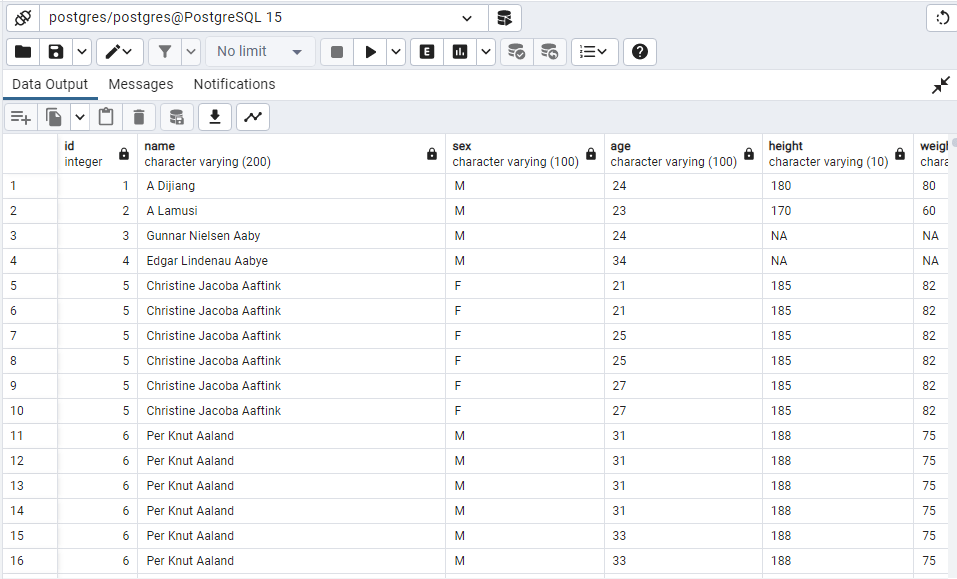
SELECT *FROM athlete_events;
You should see this
–Minumum age of the participants–
SELECT Age FROM public.athlete_events
ORDER BY Age;
you should see this
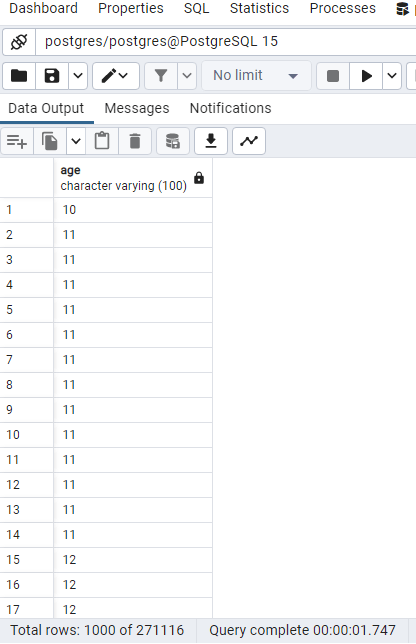
–Minimum Age looks like it is 10 Years,
–minimum height–
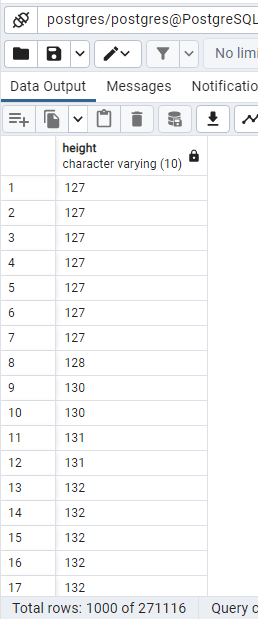
SELECT Height FROM public.athlete_events
ORDER BY Height;
–minimum height is 127–
It looks like this
SELECT Year FROM public.athlete_events
ORDER BY Year;
This is how it looks
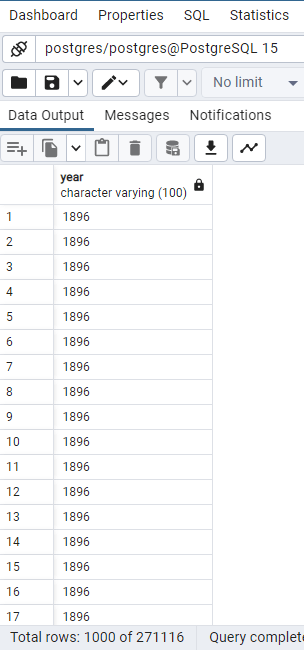
–Minimum year is 1896
First go to medal then to query tool
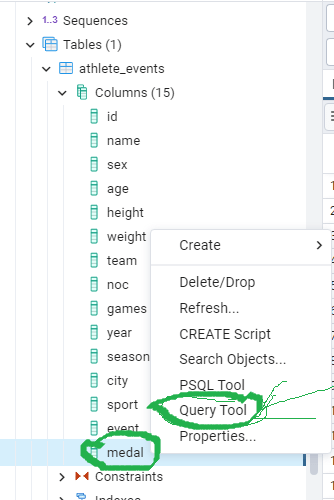
medal >Query tool then type this
DELETE FROM athlete_events
WHERE medal = ‘NA’;
you should see this
DELETE 231333 Query returned successfully in 1 secs 467 msec.
go back to athlete_events then to query tool like in this image
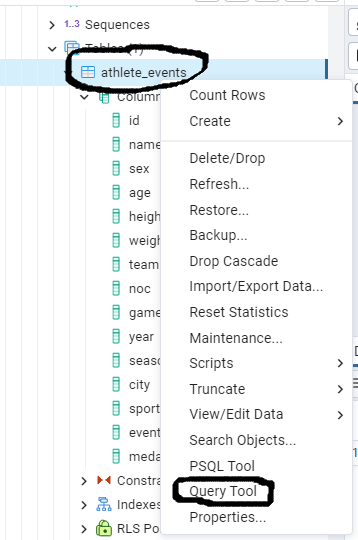
type this code
SELECT COUNT (*)Sex
FROM public.athlete_events
WHERE Sex= ‘M’
ORDER BY Sex;
you should see this
2853
type this code in query tool
SELECT COUNT (*)Sex
FROM public.athlete_events
WHERE Sex= ‘F’
ORDER BY Sex;
you should see this
11253
so Male = 2853 , Female = 11253
type this code
SELECT COUNT (*)medal
FROM public.athlete_events
WHERE medal= ‘Gold’;
you will see this
13372
so gold = 13372
type this code
SELECT COUNT (*)medal
FROM public.athlete_events
WHERE medal= ‘Silver’;
–So silver is 13116–
Type this code
SELECT COUNT (*)medal
FROM public.athlete_events
WHERE medal= ‘Bronze’;
— Bronze is 13295–
type this code
SELECT COUNT (*)medal,Sex
FROM public.athlete_events
GROUP BY Sex;
you will see this
Male 28530
Female 11253
Type this code
SELECT * FROM athlete_events
WHERE medal = (
SELECT MAX (medal)
FROM athlete_events);
You should see this
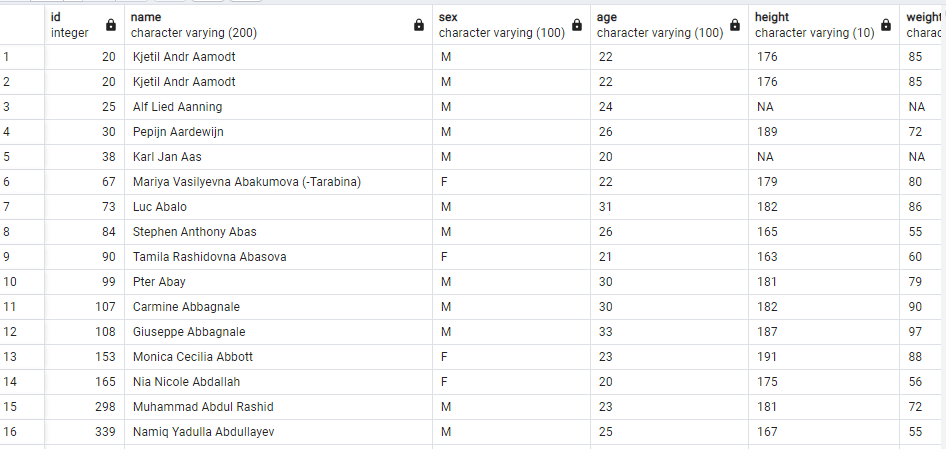
SO maximum medal is won by Kjetil Andr Aamodt!
SELECT COUNT (*) Name
FROM athlete_events
WHERE Name = (‘Kjetil Andr Aamodt’);
Kjetil won 8 medals
Type this code
SELECT *
FROM athlete_events
WHERE Name = (‘Kjetil Andr Aamodt’);
you should see this
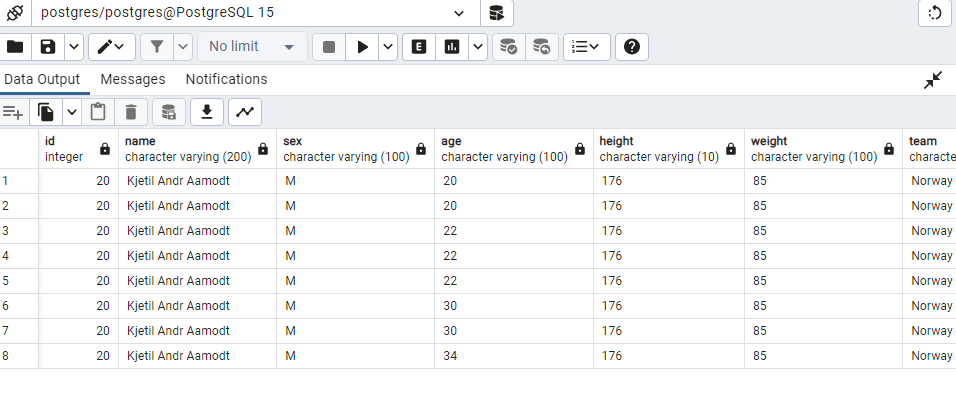
DELETE FROM athlete_events
WHERE Age = ‘NA’;
you should see this
DELETE 732 Query returned successfully in 439 msec.
type this code to alter table
ALTER TABLE athlete_events
ALTER COLUMN Age TYPE INT
USING Age::INT;
you should see this
ALTER TABLE Query returned successfully in 679 msec.
–Changed data type of Age to Integer–
–After changing data type from varchar to integer then only we can calculate average–
SELECT ROUND (AVG(Age), 2) avg_Age
FROM athlete_events;
You should see this
25.93
_so the average age of the participants is 25.93–
ALTER TABLE athlete_events
ALTER COLUMN Height TYPE INT
USING Height::INT;
or you can you can use this code output is same
SELECT Year ::Numeric(10)
FROM athlete_events;
you should see this
ALTER TABLE Query returned successfully in 546 msec.
SELECT ROUND (AVG(Height), 2) avg_Height
FROM athlete_events;
–you should see this 177.56–
SELECT COUNT (*)NOC
FROM
athlete_events
WHERE NOC=’USA’
GROUP BY NOC;
__you should see this–
–4595–
SELECT COUNT (*)NOC
FROM
athlete_events
WHERE NOC=’CHN’
GROUP BY NOC;
–985–
SELECT COUNT (*)NOC
FROM
athlete_events
WHERE NOC=’RUS’
GROUP BY NOC;
–you should see this–
–1145–
 Home Home sweet sweet home