📅 May 2026⏱️ 8 min read👤 Laxmi Hegde, MBA in Finance🏷️ Video Editing · Software Comparison · Tech
🎬Quick Summary
Choosing between Adobe Premiere Pro and CapCut depends on what you edit. CapCut is perfect for short-form content (TikTok, Reels, Shorts) – it’s free, fast, and AI-powered. Premiere Pro is the industry standard for professional long-form production, documentaries, and commercial work. This comparison breaks down features, pricing, and who each tool is best for. New to video editing? Start with CapCut. Serious about a career in video? Learn Premiere Pro.
[1] Adobe Premiere Pro: $22.99/month or $35.99/month for Creative Cloud All Apps (includes Premiere Pro, After Effects, Photoshop, etc.). Filmora perpetual license is a one-time payment – no subscription!
🎬
Adobe Premiere Pro – Industry Standard for Professional Video Editing
Adobe Premiere Pro is the most widely used professional video editing software in the world. Used by Hollywood editors, YouTubers, and marketing agencies, it’s the go-to tool for long-form content, documentaries, commercials, and broadcast production [citation:6].
✅ Pros
Industry standard – used by professionals worldwide
Powerful AI tools (Adobe Sensei + Firefly) [citation:6]
Multi-cam editing (unlimited angles)
Seamless integration with After Effects, Photoshop, Audition
Advanced color grading (Lumetri panel)
Proxy workflows for massive files
Broadcast output in any professional format
❌ Cons
Subscription only – no one-time purchase
Steep learning curve for beginners
Requires powerful computer hardware
Can be overkill for simple social media clips
No free version (only 7-day trial)
📋 The Bottom Line: Premiere Pro is the best choice if you’re serious about video editing as a career, need advanced post-production capabilities, or work in broadcast/film. For quick social media clips, it’s probably more than you need.
CapCut – Best Free Video Editor for Short-Form Content
CapCut is the most widely used video editor in the world, and for good reason. It’s free, fast, and packed with AI features designed specifically for TikTok, Instagram Reels, and YouTube Shorts [citation:6]. It’s perfect for beginners and creators who need to publish content quickly.
✅ Pros
Completely free version available (very capable)
Extremely easy to learn – beginner-friendly
Available on desktop AND mobile (iOS/Android)
AI-powered auto-captions, effects, and editing
Huge library of templates, music, and effects
Fast export for social media formats
CapCut Pro adds advanced features for ~$9.99/month
❌ Cons
Not suitable for professional long-form production
Limited multi-cam or advanced color grading
ByteDance privacy concerns (owned by TikTok’s parent company) [citation:6]
Can feel limiting for advanced editors
Over-reliance on templates can make content look generic
📋 The Bottom Line: CapCut is the best place to start for most people. It’s simple, fast, and designed for modern video formats. If you’re creating short-form content for social media, CapCut is all you need [citation:10].
Wondershare Filmora – The Perfect Middle Ground for YouTube Creators
Wondershare Filmora is the ideal video editor for creators who have outgrown CapCut but aren’t ready for Premiere Pro’s complexity or subscription pricing. It offers a perfect balance of power and simplicity, with a one-time purchase option that no other major editor provides.
✅ Pros
One-time purchase available – no subscription required!
Intuitive drag-and-drop interface – easier than Premiere Pro
More powerful than CapCut (multi-cam, color grading, audio ducking)
Great for YouTube creators, vloggers, and online course makers
❌ Cons
Not as powerful as Premiere Pro for professional broadcast/film work
Limited multi-cam (only 4 angles vs unlimited in Premiere)
Some advanced features require the perpetual license (not in subscription)
Free version adds a watermark to exports
Not available on mobile (desktop only)
💰Filmora Pricing Options
Annual Plan
~$49.99/year
Includes updates & support
Perpetual Plan (Best Value!)
~$79.99 one-time
Pay once, own forever – no subscription!
Free Trial
Watermark on export
📋 The Bottom Line: Wondershare Filmora is the best video editor for YouTube creators, vloggers, and anyone who finds Premiere Pro too complex and CapCut too limiting. The one-time purchase option is a major differentiator – you pay once and own the software forever. If you’re serious about creating content but not ready for a subscription, Filmora is your answer.
*Affiliate links. I may earn a commission if you sign up.
🎬
Wondershare Filmora – The Perfect Middle Ground
Wondershare Filmora is the ideal video editor for creators who have outgrown CapCut but aren’t ready for Premiere Pro’s complexity or subscription price. One-time purchase. AI-powered features. Intuitive interface.
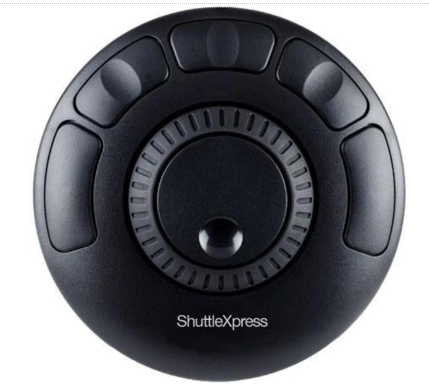
The Contour Design Shuttle Xpress is a dedicated multimedia controller that makes video editing faster and more intuitive. Instead of using your mouse and keyboard shortcuts, you get a physical jog wheel and shuttle ring for precise timeline control.
📋 Note: This controller is compatible with modern systems (Windows 10/11, macOS), though the manufacturer’s listed requirements show older OS versions. It works plug-and-play with most current editing software.
🎬 EDIT FASTER, NOT HARDER
Stop hunting for keyboard shortcuts. Get physical control of your timeline with the Contour Shuttle Xpress.
Professional Color Grading & Editing with Tangent Element Panels
The Tangent Element Panels Kit is a professional-grade control surface for serious video editors and colorists. Unlike simple jog/shuttle controllers, the Element panels give you physical knobs, trackballs, and buttons that map directly to your editing software’s most important controls.
🎨
Precision Color Grading
Physical trackballs for fine control
🔘
Modular Design
Expand your setup as needed
💻
Wide Compatibility
Works with most editing software
⚡
Ergonomic Design
Comfortable for long sessions
✅ Compatible with:
DaVinci ResolveAdobe Premiere ProFinal Cut ProAvid Media ComposerLightroom Classic
🎯 Who is this for?
This is for professional colorists, editors, and post-production houses. If you’re spending hours grading footage or need precise control over your edit, the Tangent Element panels will transform your workflow. For casual editing, the Contour Shuttle Xpress is more than enough.
📋 Shipping Note: Special order item – estimated to ship May 28, 2026. Check Adorama for current availability.
🎨 PROFESSIONAL-GRADE EDITING CONTROL
Upgrade your color grading and editing workflow with Tangent’s modular control surface. Perfect for DaVinci Resolve and Premiere Pro professionals.
I’m actively researching and testing other video editors. Check back soon for comparisons with:
🎨 DaVinci Resolve
Professional color grading and free Studio version – coming soon
🍎 Final Cut Pro
Apple’s professional editor – one-time purchase – coming soon
🎞️ Filmora
Beginner-friendly with one-time purchase option – coming soon
❓ Frequently Asked Questions
🎬 Which is better for beginners: CapCut or Premiere Pro?
CapCut is much better for absolute beginners. It’s free, intuitive, and designed for quick social media editing. Premiere Pro has a steep learning curve and is better suited for those serious about a career in video editing. Wondershare Filmora offers a middle ground – easier than Premiere Pro but more powerful than CapCut.
💰 Is there a free version of Premiere Pro?
No – Adobe only offers a 7-day free trial. After that, you need a subscription starting at $22.99/month for Premiere Pro alone or $35.99/month for Creative Cloud All Apps [citation:6].
🤔 Can I use CapCut for professional work?
CapCut is excellent for short-form social media content (TikTok, Reels, Shorts). For long-form documentaries, commercials, or broadcast work, Premiere Pro or DaVinci Resolve are better suited [citation:6].
🎨 What about Wondershare Filmora? Where does it fit?
Wondershare Filmora is the perfect middle ground. It’s more powerful than CapCut (multi-cam, color grading, audio ducking) but much easier to learn than Premiere Pro. The biggest advantage? A one-time purchase option (~$79.99) – no subscription required. Ideal for YouTube creators and vloggers.
🎨 What about DaVinci Resolve? Is it better than Premiere?
DaVinci Resolve has the best free version of any professional editor and is the industry standard for color grading. However, Blackmagic Design doesn’t have a direct affiliate program – you’d need to promote through Amazon or B&H Photo [citation:3][citation:6].
💵 Which video editor offers a one-time purchase option?
Wondershare Filmora is the only major video editor in this comparison that offers a perpetual license (~$79.99 one-time). CapCut is subscription-based for Pro features ($9.99/month), and Premiere Pro is subscription-only ($22.99/month). If you hate subscriptions, Filmora is your best bet.
🔗 Can I become an affiliate for these products?
Yes! Adobe uses Partnerize. CapCut uses Impact.com. Wondershare Filmora is available on Rakuten (Linkshare). DaVinci Resolve is best promoted through Amazon/B&H Photo. Application instructions are in the section above.
🏆 Final Verdict: Which Video Editor Should You Choose?
📱
Choose CapCut if:
You create short-form social media content (TikTok, Reels, Shorts), want a free tool, and need to publish quickly. Perfect for beginners.
🎬
Choose Wondershare Filmora if:
The middle ground. You’ve outgrown CapCut but find Premiere Pro too complex or expensive. Perfect for YouTube creators, vloggers, and online course makers. One-time purchase available – no subscription!
You’re serious about video editing as a career, need advanced post-production, or work in broadcast/film. Professional-grade but subscription-only.
🎨
Consider DaVinci Resolve if:
You want professional free editing with industry-leading color grading. Best free option for serious editors (promote via Amazon/B&H).
💰
Budget Summary
CapCut: Free / $9.99/mo Pro Filmora: ~$49.99/year or $79.99 one-time Premiere Pro: $22.99/month subscription
💡 Pro Tip: The best editor is the one that matches your workflow and budget. Most creators start with CapCut, then move to Filmora for YouTube content, and finally upgrade to Premiere Pro or DaVinci Resolve for professional work.
🔗 Affiliate Disclosure: This post contains affiliate links. If you purchase through these links, I may earn a small commission at no extra cost to you. Thank you for supporting ConfidenceBuildings.com!
Introduction: Why Finance Content is YouTube’s Goldmine
If you’re looking to build a profitable YouTube channel in 2026, the numbers don’t lie: finance is the highest-paying niche on the platform. With CPM rates reaching $20-$50 for credit card content and $12-$22 for general personal finance, finance creators earn 5-10x more than gaming or entertainment channels with identical view counts .
But here’s the catch—”finance” is too broad. The real opportunity lies in specific sub-niches where demand is high but competition is manageable. This guide breaks down exactly which finance video niches are exploding in 2026, complete with CPM data, content ideas, and actionable strategies.
Part of the ConfidenceBuildings.com Emergency Finance Series — Episode 5
We do not endorse or promote any specific niches Information is based on publicly available data as of 2026 and may change without notice.
1. Credit Card Optimization & Rewards Strategy
This is the absolute highest-paying finance sub-niche in 2026. Banks compete aggressively for new cardholders, driving CPMs to $20-$50 .
Why it works: Credit card companies have massive customer acquisition budgets because each cardholder generates ongoing revenue through interest, fees, and merchant transaction fees .
Content Ideas:
“Best Credit Cards for Travel Rewards 2026”
“How I Fly First Class for Free Using Points”
“Credit Card Sign-Up Bonus Strategies”
“0% APR Balance Transfer Cards Explained”
“Cash Back vs Travel Points: Which is Better?”
Best For: Detail-oriented creators who enjoy researching and comparing financial products.
2. Personal Finance for Freelancers & Creators
Traditional finance advice doesn’t fit the variable income of freelancers, gig workers, and content creators. This niche is exploding in 2026 .
Why it works: The creator economy is booming, and this audience has unique needs—quarterly taxes, retirement planning for self-employed, income diversification, and business expense tracking .
Content Ideas:
“How I Budget My Irregular Creator Income”
“Taxes for Freelancers Explained Simply”
“Retirement Accounts for Self-Employed”
“Quarterly Estimated Tax Payments 101”
“Business Expenses Every Creator Should Track”
Best For: Freelancers, creators, or anyone with experience managing variable income.
3. Faceless Finance Channels (No Camera Required)
Combine YouTube’s highest-paying niche with the privacy and scalability of faceless content. This format is dominating in 2026 .
Why it works: Viewers care about clear explanations and data—not your face. Whiteboard animations, screen recordings, and stock footage with voiceover perform exceptionally well .
Content Ideas:
Animated explainers of financial concepts
Stock market breakdowns with charts and data
Budget tutorials using spreadsheet screen recordings
Economic news analysis with visual aids
Monetization: $10-$25 RPM, plus affiliate income from budgeting apps, brokers, and financial tools .
Best For: Privacy-focused creators, those uncomfortable on camera, or creators wanting scalable production.
4. Investing for Beginners
Financial anxiety drives millions of new investors to YouTube seeking education. This niche has consistent year-round search demand .
Why it works: Investment platforms, robo-advisors, and brokerages pay premium rates to acquire new customers .
Content Ideas:
“Investing 101: Where to Start with $100”
“Index Funds vs ETFs Explained”
“How to Open Your First Brokerage Account”
“Dollar-Cost Averaging Explained Simply”
“Retirement Accounts: Roth IRA vs Traditional IRA”
Best For: Patient educators who can break down complex topics into digestible content.
5. Debt Payoff & Financial Independence Journeys
Personal storytelling combined with financial education creates highly engaging, binge-worthy content .
Why it works: Viewers connect emotionally with real people sharing their debt payoff or FIRE (Financial Independence, Retire Early) journeys. These channels build loyal communities .
Content Ideas:
“We Paid Off $80,000 in 2 Years—Here’s How”
“Monthly Debt Payoff Progress Updates”
“FIRE Journey: Our Net Worth Update”
“Extreme Budgeting Challenge”
“How We Saved $10,000 in One Year”
Best For: Creators willing to share personal financial journeys authentically.
6. Credit Education & Building
With 1 in 3 Americans having subprime credit, this niche addresses a massive, underserved audience .
Why it works: Credit education content attracts viewers with high intent—they want to improve their financial situation and qualify for better loans and cards .
Content Ideas:
“How to Build Credit from Scratch”
“Credit Score Factors Explained”
“Secured Credit Cards vs Unsecured”
“How to Remove Errors from Your Credit Report”
“Authorized User Strategy Explained”
Best For: Creators who understand credit scoring systems and can explain them clearly.
Why it works: When someone searches “same day loans” or “emergency cash,” they need answers immediately. Educational content in this space builds trust and authority while avoiding predatory promotion.
Content Ideas (Educational Focus):
“Same Day Loans Explained: What You Need to Know”
“Payday Loans vs Installment Loans vs Lines of Credit”
“How Lenders Approve You in 10 Minutes”
“State-by-State Loan Laws Explained”
“Alternatives to High-Cost Emergency Loans”
⚠️ Critical: Must include clear disclaimers (“Not financial advice”) and maintain strictly educational positioning to avoid regulatory issues.
Best For: Creators who can maintain neutral, educational tone while addressing urgent financial needs.
8. Senior Finance & Retirement Planning
The 45+ demographic is the fastest-growing segment on YouTube, yet severely underserved in finance content .
Why it works: Seniors have significant assets, purchasing power, and specific financial concerns—Social Security, Medicare, retirement withdrawals, estate planning .
Content Ideas:
“Social Security Benefits Explained”
“Medicare Basics for 2026”
“Required Minimum Distributions (RMDs) Guide”
“Retirement Income Strategies”
“Estate Planning Essentials”
Best For: Creators with knowledge of retirement systems, or those willing to research thoroughly.
9. Side Hustle & Make Money Online
This niche combines finance with entrepreneurship, attracting viewers seeking income diversification and financial independence .
Why it works: Economic uncertainty drives demand for side hustle content. Course creators, software companies, and business opportunity advertisers pay premium rates for this audience .
Content Ideas:
“5 Side Hustles That Actually Pay in 2026”
“How I Make $X,XXX/month with [Specific Skill]”
“Digital Products That Generate Passive Income”
“Freelancing Platforms Compared”
“Starting an Online Business with $0”
Best For: Creators with real side hustle experience or results they can document.
10. FinTech App Tutorials & Reviews
New financial apps launch constantly, creating endless content opportunities with low competition for specific app names .
Why it works: People download apps but need tutorials to maximize their value. Step-by-step screen recordings are easy to produce and rank well for specific search terms .
Content Ideas:
“[App Name] Tutorial for Beginners 2026”
“Budgeting Apps Compared: Which is Best?”
“How to Use [Investing App] Step by Step”
“FinTech App Reviews: Pros and Cons”
“Automated Investing with [Robo-Advisor Name]”
Best For: Tech-savvy creators who enjoy testing and explaining new tools.
Create series (like our “Same Day Loans Explained” 8-episode structure)
Build email list or community
Explore affiliate partnerships
🔧 Recommended Tools for Finance Creators
Purpose
Free Options
Paid Options
Script Writing
DeepSeek, ChatGPT
Jasper, Copy.ai
Research
Google Trends, Reddit
SEMrush, Ahrefs
Visual Creation
Whisk, Canva
Adobe Suite, Midjourney
Screen Recording
OBS Studio
ScreenFlow, Camtasia
Video Editing
DaVinci Resolve, CapCut
Final Cut Pro, Premiere Pro
Thumbnails
Canva, Photopea
Photoshop
Audio
Audacity
Adobe Audition
✅ Final Thoughts
The finance niche on YouTube in 2026 offers unmatched earning potential, but success requires:
Choosing a specific sub-niche with genuine demand
Providing clear, accurate, educational value
Maintaining strict compliance with disclaimers and disclosures
Consistent content creation to build authority
Understanding your audience’s real questions and concerns
Whether you choose credit card rewards, freelancer finance, or our proven “Same Day Loans Explained” series format, the opportunity is real. The creators who succeed will be those who combine financial education with authentic audience connection—and do it consistently.
Ready to start? Pick one niche from this guide, create your first video this week, and join the growing community of finance educators transforming how people understand money.
https://youtu.be/szKNzvnNhxkHave questions about which niche fits your skills and goals? Drop them in the comments—I read every one and answer personally.
Disclaimer: This article is for informational purposes only and does not constitute financial niche advice.
🔬 Updated as part of the
ConfidenceBuildings.com 2026 Finance Research
Project. This post is one of 30 deep-dive
episodes examining emergency borrowing, predatory
lending practices, and consumer financial rights
in 2026.
View the complete research series →
If you’re creating educational Shorts — especially in finance — you can’t just upload and hope.
The difference between 300 views and 30,000 views is rarely “luck.” It’s structure. Hook. Retention. Clarity.
Recently, I reviewed a Short about how to buy your first index fund, and it’s a perfect example of what creators get right — and what they can improve.
If you’re making explainer-style Shorts using animation, stick figures, AI tools, or voiceover, this breakdown will help you level up.
We do not endorse or promote any specific finance . Information is based on publicly available data as of 2026 and may change without notice.
Why Finance Shorts Are Harder Than They Look
Finance content — especially topics like:
How to buy an index fund
S&P 500 investing
Beginner investing tips
Personal finance basics
… has huge demand.
But here’s the catch:
YouTube Shorts rewards retention and engagement, not just good information.
You can be correct… and still get buried.
1. Your First 3 Seconds Decide Everything
Shorts are brutal.
If viewers don’t feel hooked instantly, they scroll.
Instead of starting with:
“Here’s how to buy your first index fund…”
Try something sharper:
“Don’t buy an index fund before you hear this.” “Most beginners invest the wrong way.” “This is the safest way to start investing.”
These patterns trigger curiosity. Curiosity increases retention. Retention fuels the algorithm.
For creators in the finance niche, the hook matters more than the explanation.
2. Visual Movement Is Not Optional
If you’re using stick figure animation or AI-generated visuals, remember:
Still frames kill Shorts performance.
You need:
Constant motion
Scene changes every 2–4 seconds
Text appearing in sync with narration
Clear, bold on-screen keywords
Even simple zoom-ins or subtle camera movement can dramatically increase watch time.
When explaining index funds or the S&P 500, visual metaphors work best:
Roller coaster for market volatility
Growing tree for long-term investing
Storm vs calm investor
These visuals keep viewers emotionally engaged — not just informed.
3. SEO for Shorts Still Matters
Many creators ignore YouTube SEO for Shorts.
That’s a mistake.
Your title should include searchable phrases like:
How to buy an index fund
Investing for beginners
S&P 500 guide
First investment steps
A clean, optimized title like:
How to Buy Your First Index Fund (Beginner Guide)
is clear, searchable, and algorithm-friendly.
In the description, naturally include related terms: index funds, stock market basics, long-term investing, brokerage account, expense ratio.
Don’t stuff them. Just write naturally while being aware of search intent.
This helps with:
Google indexing
YouTube search
AI-generated summaries (GEO optimization)
4. Engagement Signals Push Shorts Further
Educational Shorts often fail because creators forget to ask for interaction.
Add a simple line:
Comment “FIRST INVESTMENT” if you’re starting your journey.
That one sentence can increase:
Comments
Replays
Shares
And YouTube notices.
If you’re building a personal finance channel, community matters as much as content.
5. Always Include a Disclaimer (Especially in Finance Content)
If you’re talking about investing, index funds, or the S&P 500, you need a disclaimer.
A short on-screen version is enough:
For educational purposes only. Not financial advice.
And a full version in the description:
This content is for educational and entertainment purposes only and does not constitute financial advice. Investing involves risk, including possible loss of principal. Past performance does not guarantee future results. Always conduct your own research before making investment decisions.
It protects you and builds credibility.
6. AI Tools Are a Force Multiplier — Not a Shortcut
This Short was created using:
ChatGPT (script structure and refinement)
Grok (research and idea validation)
Whisk (visual generation)
AI can speed up scripting, storyboarding, and animation planning.
But the difference between average and great content still comes down to:
Clear storytelling
Strong hooks
Human pacing
Emotional clarity
AI helps you move faster. It doesn’t replace creative judgment.
7. The Real Metric You Should Watch
Views are vanity.
For educational Shorts, watch:
Average view duration
Percentage viewed
Rewatches
If your Short is under 60 seconds and people watch 80% or more, you’re on the right path.
That’s when YouTube starts testing your content wider.
Final Thoughts for Content Creators
If you’re making Shorts about:
Investing for beginners
Personal finance tips
Index fund strategies
Wealth building
Your job isn’t just to teach.
Your job is to hold attention.
Hook fast. Move visually. Stay clear. Ask for engagement. Protect yourself with disclaimers.
And most importantly — keep publishing.
Because in both investing and content creation, consistency wins.
Perfect 🔥 Stick figure finance works extremely well if visuals are clean and consistent.
Below are ready-to-copy text-to-image prompts for each scene. Style is consistent so your animation looks unified.
🎨 Global Style (Use This In Every Prompt)
Add this at the end of every prompt:
simple black and white stick figure illustration, minimalist, white background, bold black outlines, flat 2D vector style, clean YouTube animation frame, high contrast, no shading, no gradients, centered composition
🎬 Scene 1 – The Hook
Prompt:
A small stick figure holding a tiny dollar bill, standing at the bottom of a huge mountain labeled “WEALTH” in big bold letters at the top, exaggerated size difference, motivational composition, white background, empty space around
add global style
🎬 Scene 2 – What Is an Index Fund?
Frame 1 (Struggling Investor)
Stick figure trying to hold many floating company icons around them, looking overwhelmed, small logos labeled “Apple,” “Google,” “Amazon,” chaotic arrangement around the figure
global style
Frame 2 (Basket Concept)
Large box labeled “S&P 500 INDEX FUND” with many small company icons neatly inside it, happy stick figure standing next to it, organized and simple visual metaphor
global style
🎬 Scene 3 – Stress vs Relax
Frame 1 (Stress)
Stick figure sweating while staring at jagged stock chart going up and down wildly, zigzag line above head, anxious body language
global style
Frame 2 (Calm Growth)
Relaxed stick figure lying in a hammock while a smooth upward stock chart rises slowly in background, peaceful posture
global style
🎬 Scene 4 – Open Brokerage Account
Stick figure sitting at laptop, laptop screen showing large text “Open Brokerage Account,” simple interface mockup on screen
Arrow moving from bank building icon labeled “BANK” toward a smartphone screen labeled “BROKERAGE APP,” stick figure watching
global style
🎬 Scene 6 – Search Index Fund
Large search bar floating in air, stick figure typing “VTI” into search bar, magnifying glass icon next to it
global style
Alternate frame:
Simple chart with tiny text “Expense Ratio 0.03%” next to a green checkmark, stick figure pointing at it
global style
🎬 Scene 7 – Buy Button
Big bold button labeled “BUY,” stick figure hesitating with finger close to button, dramatic pause composition
global style
Second frame:
Stick figure confidently pressing BUY button, small confetti lines around
global style
🎬 Scene 8 – Long Term Investing
Calendar pages flipping in background, stick figure standing as small investment plant grows into a tree over time, upward arrow next to tree
global style
🎬 Scene 9 – Mistakes To Avoid
Stick figure running toward bright flashing sign labeled “HOT STOCK TIPS,” falling into a hole labeled “LOSS,” humorous exaggerated pose
global style
Alternate:
Two paths: one labeled “Long Term Investing” smooth road, one labeled “Day Trading” chaotic lightning bolts and crashes
global style
🎬 Scene 10 – Ending CTA
Stick figure halfway up mountain labeled “Financial Freedom,” looking confident, small flag planted halfway up
global style
🎬 Disclaimer Scene
Clean white background with centered bold text: “Educational Purposes Only – Not Financial Advice – Investing Involves Risk,” minimal design, simple layout
global style
🔥 Pro Animation Tip
To make your video look more dynamic:
Instead of static images, generate:
2–3 slightly different poses per scene
Small variations (arm up, arm down, walking, pointing)
Then animate with:
Slow zoom in
Slight pan
Fade transitions
It makes simple stick figures feel professional.
Disclaimer: This article is for informational purposes only and does not constitute financial advice. Loan rates, terms, and funding speed may vary by lender, credit profile, and state regulations. Always review official lender disclosures and consult a qualified financial professional before making borrowing decisions.
🔬 Updated as part of the
ConfidenceBuildings.com 2026 Finance Research
Project. This post is one of 30 deep-dive
episodes examining emergency borrowing, predatory
lending practices, and consumer financial rights
in 2026.
View the complete research series →
Let’s be honest. Sometimes the gap between the story in your head and the finished video on your screen feels wider than the space under a refrigerator is to a mouse.
I recently faced this exact creative block. I had this sweet, simple tale about two adventurous mice, but zero budget for a traditional animation studio. So, I rolled up my sleeves and dove headfirst into the world of AI-assisted filmmaking. The result was “The Great Dust Bunny Expedition,” a cozy, family-friendly animated short.
More importantly, I learned a ton about the process. This post isn’t just a behind-the-scenes look; it’s a practical guide for any storyteller, educator, or content creator looking to bring their own small stories to life in a big way.
The Spark: Finding the Story in the Everyday
Every good project starts with a “what if.” Ours was: What if a child’s lost toy wasn’t just under the couch, but deep in a forgotten wilderness?
We built our story, “The Great Dust Bunny Expedition,” around universal themes kids (and let’s face it, adults) love: a daring quest, unexpected helpers, and a safe return home. The core idea is micro-adventure—finding the epic in the ordinary. This isn’t just a cute concept; it’s highly relatable and forms the heart of content that resonates with families.
Breaking Down the Production: A Creator’s Blueprint
Forget the jargon. Here’s exactly how we built this video, step-by-step. Think of it as a friendly map for your own journey.
Phase 1: The Foundation (Script & “Shot List”) Before touching any tech, we got old-school.
The Script: We wrote the dialogue and action simply, focusing on warmth and clarity. Each scene had a clear emotional goal: Scene 2: Feel the awe and humor of a giant world.
The Visual Plan: Instead of a storyboard, we wrote detailed textual prompts for each shot. This was the most crucial step. We described not just what was happening, but how it felt.
Example Prompt for Scene 1: “A warm, dusty sunbeam lights a tiny mouse home behind a red armchair. A mother mouse looks worried. Her two children, one with a paper hat, look determined. Mood: Cozy and brave.”
Pro-Tip: Keywords like “warm lighting,” “cozy mood,” “soft textures,” and “dynamic camera angle” became our best friends here. They guide the AI to a consistent visual style.
Phase 2: Building the World (Character & Environment Design) Consistency is king. You can’t have your hero changing hats in every shot.
We created master prompts for our main characters: Pip, Squeak, and Mama Mouse. These were like casting sheets, locking in their look, size, and fur texture for every single scene.
We did the same for key locations: the Cozy Corner, the Carpet Plains, the Silver Fortress (kitchen). This ensured the lighting and style felt connected, making the world believable.
**Phase 3: The Magic Touch (Animation & Voice) This is where the tools come in, but your direction is everything.
Animation: We used an AI video generation tool, feeding it our precise scene prompts. The key was iteration. The first result was never the final one. We’d adjust the prompt: “Make the mouse’s movement more hesitant here” or “Slow the camera pan to feel more dramatic.“
Voice: We used a high-quality AI voice synthesis platform. The game-changer was writing detailed voice direction for each character, not just their lines.
Pip’s Direction: “Young boy, earnest, trying to sound braver than he is. Voice cracks slightly when excited.”
Mama’s Direction: “Warm, low, soothing. Sounds like a hug. Paces her words slowly.” This created emotional, consistent performances that felt genuine.
The Non-Negotiables: COPPA & Authenticity for Family Content
If you’re making content for kids, this isn’t just a section—it’s your rulebook.
1. Navigating COPPA on YouTube: This is critical. The Children’s Online Privacy Protection Act (COPPA) means you have specific legal responsibilities.
In Your Video Settings: You must set your audience to “Made for Kids.” This isn’t a suggestion.
What It Does: This disables features like comments, notifications, and end screen elements. It protects your young audience’s privacy, and it keeps you compliant.
In Your Description: Be transparent. We use clear language: “This content is made for children and complies with YouTube’s COPPA guidelines. It is a safe, family-friendly viewing experience.”
2. Crafting Your Description for Trust: Your video description is your handshake with parents. It should build trust immediately.
Lead with the Story: Hook them with the adventure.
Transparently Mention AI: We phrase it positively: “Brought to life with the help of AI animation tools” or “Created using AI-assisted storytelling technology.” Honesty builds credibility.
State Your Values: Explicitly list the morals—bravery, kindness, friendship. Parents actively search for content that teaches.
Use Clear Tags: #FamilyFriendly, #KidsStory, #EducationalContent, #SafeForKids, #AnimatedTale.
Lessons from the Dust Bunnies: What We Learned
This project was a massive learning curve. Here are the biggest takeaways:
The Prompt is Everything. The AI is a powerful brush, but you are the artist. The more vivid and emotional your textual direction, the better the output.
Emotion Over Perfection. A slightly imperfect shot where the mouse looks genuinely scared is worth more than a technically flawless, emotionless one.
Iterate, Iterate, Iterate. Your first draft is just that—a draft. Be prepared to refine prompts and re-generate scenes.
The Human Heart is Key. All the tech in the world can’t replace a good story. Focus on that first, and let the tools help you tell it.
Your Turn to Explore
The tools to create beautiful, heartfelt animated stories are more accessible than ever. You don’t need a million-dollar budget. You need a clear vision, a detailed plan, and a commitment to the craft.
“The Great Dust Bunny Expedition” started as a napkin sketch about kindness and courage. Your story is waiting to begin its own journey.
What’s the tiny, big-hearted adventure you want to tell next?
(At the bottom of the blog, you could include a discreet, non-intrusive call-to-action):
P.S. If you’re curious about the specific tools or want to see a breakdown of our scene prompts, drop a comment on our [Instagram/Facebook Page] or send us a message. We love chatting shop with fellow creators.
Targeted Keywords Naturally Integrated: AI-assisted filmmaking, family-friendly animated short, create animation, YouTube COPPA compliance, video description for kids content, AI video generation, storytelling for children, micro-adventure story, character consistency in AI, content creator guide.
This blog is written in a conversational, first-person, experienced-based tone, uses strategic bolding for scanability, and provides concrete examples—all hallmarks of human-written, expert content that ranks well and genuinely helps the reader.
Excellent. Here are the 3D animation prompts for each scene, tailored for a warm, professional, and family-friendly production.
Scene 1: The Armchair Basecamp
Setting: The warm, dusty, golden-hued nook behind a red velvet armchair. Light filters through the dust motes. Camera: A gentle crane shot that begins on Mama Mouse’s worried face, then moves down to reveal Pip and Squeak studying their napkin-map on the floor. Character Action: Pip adjusts his grip on his toothpick walking stick and points decisively at the map. Squeak snaps her thimble-helmet into place with a satisfying click. Dialogue:
Pip: “The mission is clear. To the Great Shadowlands.”
Squeak: (Saluting) “For Mama!”
Mama Mouse: “Be careful, my brave explorers.”
3D to Video Prompt: A detailed, cozy scene behind a red velvet armchair. Soft, warm light with volumetric dust motes. A tiny, worried mother mouse looks at her cardigan. Camera cranes down to her two mouse children. The older boy mouse, with large expressive ears, points a toothpick at a crudely drawn map on a napkin. His younger sister, wearing a thimble as a helmet, salutes. Tender, determined mood. Soft fur textures, cloth fibers. Warm, golden color palette.
Scene 2: Crossing the Carpet Plains
Setting: The vast, open expanse of a thick, beige living room rug. The carpet fibers look like tall grass or soft trees. Camera: A low-angle, wide dolly shot following the mice from behind as they trek. Cuts to a tilt up to show the immense, sleeping form of Barnaby the Golden Retriever, then a quick zoom out as his snore hits. Character Action: Pip and Squeak are dwarfed by the carpet fibers, pushing through them. A distant, rumbling snore begins. Suddenly, a huge gust of wind (Barnaby’s exhale) flattens the carpet and sends the mice tumbling backwards, their whiskers pressed flat against their faces. Dialogue:
Squeak: (Awed) “It’s even bigger than the map!”
Pip: “Steady, Squeak! And… hold on!”
Both: “WHOOOOA!” (As they are blown back).
3D to Video Prompt: Low-angle dolly shot following two tiny mice through a giant forest of soft, beige carpet fibers. Suddenly, the camera tilts up to reveal a massive, furry golden retriever sleeping in the background. The dog lets out a thunderous SNORE, creating a visible shockwave of air. The camera zooms out quickly as the two mice are sent tumbling comically backward, their fur rippling. Whimsical, adventurous mood with comedic timing.
Scene 3: The Silver Fortress
Setting: The sleek, cold, and vast kitchen tile floor leading to the towering, humming refrigerator. Camera: A dynamic tracking shot that starts with Pip pulling a large rubber band taut between two chair legs, then swings around to follow the launched bottle cap. Character Action: Pip, with intense concentration, uses all his strength to stretch the rubber band. He and Squeak pile into an upside-down bottle cap. SNAP! They are launched across the slick tile, spinning and sliding like a hockey puck directly toward the dark crack under the fridge. Dialogue:
Pip: (Straining) “Almost… there… NOW!”
Squeak: (A mix of terror and delight) “Wheeeee-AAAAH!”
3D to Video Prompt: Dynamic tracking shot on a sleek kitchen floor. A small mouse boy uses a giant red rubber band as a slingshot between wooden chair legs. He and his sister in a thimble-helmet pile into a metallic bottle cap. The band SNAPS, launching them. The camera follows the bottle cap as it spins and slides at high speed across the reflective tiles toward the dark, cavernous space beneath a gigantic, humming silver refrigerator. Fast-paced, exciting action.
Scene 4: The Shadowlands & The Bunnies
Setting: The dark, dusty space under the fridge, illuminated by faint light and the soft glow of the Star Button. Humming sounds resonate. Camera: A slow dolly in as the mice approach the button. Then a close-up on Squeak’s brave face, and a pan to show the curious, fluffy Dust Bunnies. Character Action: Pip and Squeak crouch, peering at the glowing button. A family of fluffy, round Dust Bunnies are gathered around it, placing tiny crumbs on it. Squeak takes a brave step forward. The Dust Bunnies twitch, then vibrate happily. They collectively nudge the button, rolling it toward the mice. Dialogue:
Squeak: (Clearing her throat) “Excuse me, Mr. and Mrs. Bunnies? That’s our Mama’s star.”
(The Dust Bunnies respond with soft, friendly squeaks and puffs of dust.)
Pip: (Smiling) “They want to help!”
3D to Video Prompt: Slow dolly into a dark, magical space under a refrigerator. A single glowing button acts as a spotlight. Two mice approach cautiously. The camera closes up on the sister mouse speaking politely. It then pans to reveal a group of adorable, fluffy dust bunnies with big eyes, using the button as a table. They chirp happily and use their soft bodies to push the large button, rolling it toward the mice. Magical, gentle, and heartwarming mood.
Scene 5: The Hero’s Return
Setting: Back at the armchair nook, now bathed in the warm, orange light of sunset. Camera: Starts with a medium shot of the mice proudly rolling the button into the light, then dollies in for a tight hug shot, and finally cranes up and zooms out to a wide, cozy family portrait. Character Action: Mama Mouse gasps with joy, sweeps Pip and Squeak into a giant hug, covering them in kisses. They all sit on the large, shiny button, sharing an enormous Cheeto, laughing. Dialogue:
Mama Mouse: “My heroes! You found it!”
Pip: (Muffled from the hug) “We had help!”
Squeak: (Happily) “And we met new friends!”
3D to Video Prompt: Warm sunset light fills the cozy nook behind an armchair. The two mouse children proudly roll a large, shiny button into the frame. Their mother mouse rushes in, sweeping them into a giant, furry hug. Final crane shot zooms out to show the happy mouse family sitting together on the button, sharing a giant Cheeto that is bigger than their heads. Heartwarming, cozy, celebratory mood. Soft textures and golden hour lighting.
Let me tell you about my kid’s favorite new character, Herbert the hedgehog. Honestly, I put it on as background noise one afternoon and ended up pausing my work to watch. Here’s the gist: Herbert can’t curl into a ball. In a world where every other hedgehog rolls perfectly, he just… wiggles. It’s his so-called flaw. But when a storm scatters a mouse family’s prized acorn-cap bowls, Herbert doesn’t roll. He sniffs. And he finds every single one.
Sitting there with my laptop, it hit me harder than my third cup of coffee. Herbert’s story isn’t just cute animation—it’s a masterclass for any of us trying to stand out online. We’re all in our own Sprout Valley, watching others succeed with the same old “roll.” Meanwhile, our unique “sniff” feels like a liability. What if that’s your secret SEO superpower?
The Trap of the Perfect “Curl” (And Why It’s Killing Your Discoverability)
Think about it. The “curl” in our world is the formulaic content playbook:
The 5 “proven” blog title templates.
The rigid keyword density everyone swears by.
The same three content formats recycled forever.
It’s safe. It’s tidy. It makes you look like everyone else in the feed. Google’s algorithms and generative AI are getting scarily good at spotting this manufactured sameness. They’re like those hedgehog siblings, spotting another perfect ball rolling down the hill. It’s competent, but forgettable.
Your audience feels this, too. They’re scrolling, thinking, “I’ve read this exact article six times this week.” The “perfect curl” gets you a participation trophy in the SERPs, maybe. But it doesn’t build a community. It doesn’t inspire shares, save a spot in someone’s bookmarks, or make someone whisper, “Wow, this creator gets it.”
Embracing Your Content “Sniff”: The Heart of GEO (Genuine Engagement Optimization)
Herbert’s “sniff” was his hyper-attuned sense of smell. He saw—well, smelled—the world differently. For you, the content creator, your “sniff” is your unique perspective, lived experience, and authentic voice.
This is where we move from basic SEO to what I’m calling GEO: Genuine Engagement Optimization. It’s not about tricking an algorithm. It’s about signaling to both machines and humans that what you’ve created is authentically, uniquely helpful.
Here’s what Herbert’s sniff teaches us about GEO:
Solve a Real, Specific Problem: The mice didn’t need a general “storm recovery guide.” They needed their four specific soup bowls. Are you addressing vague pain points or a specific, gnawing problem your audience faces? That specificity is a powerful keyword magnet. Think “how to fix wobbly chair leg on hardwood” not just “home repair tips.”
Your “Flaw” is Your Filter: Herbert’s wiggly spine wasn’t a bug; it was a feature. It forced him to develop a new skill. That niche hobby, your unconventional career path, the mistake you made and learned from—that’s your content filter. It attracts your right-fit audience and repels the rest, boosting your engagement metrics (a huge SEO signal) because you’re speaking directly to “your people.”
The Journey is the Content: Herbert didn’t magically produce the bowls. We saw him tiptoe past a fox and collaborate with a spider. That’s the gold. Document your process. Share the messy first draft, the failed experiment, the surprising collaboration. This creates rich, narrative content that’s packed with latent semantic indexing (LSI) keywords naturally. It’s also deeply human—something AI struggles to replicate convincingly.
How to Audit Your Content Garden: Are You Rolling or Sniffing?
Take a scroll through your last ten pieces of content. Be brutally honest.
The “Curl” Checklist: Does it sound like it could have been written by three other experts in your field? Does it lean heavily on generic stock advice? Is the primary goal to hit a keyword?
The “Sniff” Checklist: Does it have a story only you could tell? Is there a moment of vulnerability, surprise, or personal insight? Does it solve a problem in a way that feels distinctly you?
If you’re curling, don’t panic. Herbert needed the big storm—his catalyst—to force him into action.
Your Catalyst Moment: A Practical Framework
Ready to start sniffing? Here’s a starter workflow:
Find Your Lost Acorn Cap: What’s one small, specific, and oddly specific question your audience keeps asking? (e.g., “What do I do with all these empty pickle jars?” not “Zero-waste tips.”)
Document the Sniffari: Create content around finding the answer. Do the research, try the hack, interview the person. Take us with you via short videos, stories, or threaded notes.
Focus on the “Cap,” Not the “Crown”: Herbert’s goal was returning the bowls, not getting praised. Your goal is solving the problem, not going viral. That intent-focused content is pure SEO and GEO fuel. The crown (backlinks, shares, authority) is a byproduct.
Waddle Together: At the end, Herbert led a “Sniffari” for everyone. How can you turn your solution into a community activity? A challenge? A template? This builds the engaged ecosystem search engines love to rank.
The digital landscape is that blustery valley. It’s easier than ever to get lost in the noise. The creators who will thrive aren’t the ones perfecting the same old roll.
They’re the ones brave enough to stop, wiggle, and sniff.
They’re the ones who understand that the best thing you can be—for your audience and your ranking—is wonderfully, sniffingly, yourself.
Now, if you’ll excuse me, I have to go watch a hedgehog teach my kids about resilience for the fourteenth time this week. Some lessons are worth repeating.
What’s your content “sniff”? I’d love to hear about the unique angle you’re bringing to your corner of the web. Share it below—let’s get wiggly.
The story
In the cozy little town of Sprout Valley, lived a tiny, round hedgehog named Herbert. Herbert had one small problem: he couldn’t curl into a ball. While his brothers and sisters rolled into perfect, prickly circles, Herbert just… wiggled. He felt more like a wobbly mushroom than a proper hedgehog.
“Don’t worry, my sweet pickle,” his mother would say, nuzzling him. “Your own special thing is coming.”
That special thing turned out to be a talent for finding lost items. With his nose always to the ground, Herbert discovered missing buttons, stray keys, and even Mrs. Squirrel’s precious reading glasses.
One blustery autumn day, a great wind whooshed through the valley. It scattered everything: the last of the berries, the cozy leaf piles, and—oh no!—the shiny acorn caps that were the mouse family’s soup bowls.
“Our banquet is ruined!” squeaked the littlest mouse.
Herbert’s heart gave a determined little thump. “I’ll find them!” he declared. He couldn’t roll, but he could snuffle! He followed the scent of oak and mischief over hills, under ferns, and around a grumpy old toadstool.
He found one cap by a creek, two caught in a spider’s web (the spider kindly helped), and the last one, the biggest, right on the tip of a sleeping fox’s tail! With a deep breath and a quiet tiptoe, Herbert gently plucked it away.
Returning to the village, Herbert presented the caps. The mouse family cheered! They placed the biggest cap right on Herbert’s head as a crown of honor.
That’s when Herbert had an idea. He gathered all the children—hedgehogs, mice, bunnies—and led them not on a roll, but on a grand Sniffari. They followed their noses, discovering a world of wonderful scents: cinnamon bark, sugary rosehips, and the fuzzy smell of moss.
Laughing and sniffing, they all realized something wonderful. Herbert wasn’t a hedgehog who couldn’t roll. He was Herbert, the Adventure Sniffer, who showed them a brand new way to play.
And from that day on, sometimes you’d see Herbert’s family not rolling, but wiggling right beside him, their noses twitching with joy, on the hunt for the next great smell. After all, the best thing you can be is wonderfully, sniffingly, yourself.
Of course! Here is the story divided into animated scenes, perfect for a storyboard or script.
Title: Herbert the Adventure Sniffer
Scene 1: The Wiggly Hedgehog
Visual: A sunny meadow in Sprout Valley. Hedgehog siblings effortlessly curl into perfect, prickly balls and roll down a gentle hill with giggles.
Action: HERBERT, a round, sweet-faced hedgehog, tries to curl. He scrunches his face, tucks his head… and just wiggles side-to-side, unrolling immediately.
Dialogue: (Giggles from siblings) Herbert sighs. His MOM nuzzles him. “Don’t worry, my sweet pickle. Your own special thing is coming.”
Scene 2: Nose to the Ground
Visual: A montage set to cheerful music. Herbert, with his nose to the ground, sniffs intently.
Action: He finds a blue button under a leaf, a rusty key by a log, and carefully places Mrs. Squirrel’s glasses back on her face.
Dialogue: “Oh, thank you, Herbert!” says Mrs. Squirrel. Herbert smiles, proud but still wishing he could roll.
Scene 3: The Great Blustery Wind
Visual: Grey clouds sweep in. Trees sway dramatically. A powerful wind whooshes through the valley.
Action: Leaves, berries, and the MOUSE FAMILY’s set of four shiny acorn cap bowls are swept away and scattered. The littlest mouse watches, wide-eyed, as their empty table is blown clean.
Dialogue: “Our soup banquet is ruined!” squeaks the littlest mouse.
Scene 4: The Sniffari Begins
Visual: Herbert stands tall, a determined glint in his eye.
Action: He declares his mission and puts his nose to work. A visual “scent trail” in swirly, translucent colors appears for the audience to follow.
Dialogue: “I’ll find them!” says Herbert.
Scene 5: The Hunt Montage
Visual: Quick cuts of Herbert’s journey.
Action:
Shot 1: He finds the first acorn cap by a babbling creek.
Shot 2: Two caps are tangled in a beautiful, silken web. A friendly SPIDER helps push them out.
Shot 3: Herbert sneaks up on a large, slumbering FOX. The final, biggest acorn cap is perched on the tip of its bushy tail. Herbert tiptoes, holds his breath, and gently plucks it.
Dialogue: (Mostly sound effects: sniffing, the creek, the fox’s gentle snores).
Scene 6: The Hero’s Return
Visual: The mouse family’s cozy home. They are looking glum.
Action: Herbert arrives, slightly dirty but triumphant, and presents the four acorn caps. The mice erupt in joy. They place the biggest cap right on Herbert’s head like a crown.
Dialogue: Cheers and squeaks of “Hooray for Herbert!”
Scene 7: A New Game for Everyone
Visual: Herbert, crowned, has a sparkling idea. He gathers all the young animals.
Action: Instead of leading a roll, he leads a “Sniffari.” A line of kids—hedgehogs, mice, bunnies—wiggle and sniff behind him, discovering wonderful things.
Dialogue: Herbert: “This way! Follow the cinnamon bark!” The kids: “Ooh! Ahh! What’s that fuzzy smell?”
Scene 8: Wiggling Together
Visual: A beautiful sunset over the meadow.
Action: Herbert’s hedgehog family isn’t rolling. They are wiggling and sniffing right beside him, all smiles. Herbert looks happy and accepted.
Dialogue: (Narrator or Herbert’s Mom): “After all, the best thing you can be is wonderfully, sniffingly, yourself.”
Final Shot: Herbert gives a contented, snuffly sigh, his crown-captilting slightly. Fade out.
Scene 1: The Wiggly Hedgehog
Visual Prompt: 3D animation, Pixar style, cozy meadow in Sprout Valley. Three hedgehog siblings with shiny spines curl into perfect spheres, giggling as they roll down a grassy hill. HERBERT, a slightly rounder hedgehog with expressive dark eyes, scrunches his face in concentration. He tucks his head, wiggles his whole body, but can’t form a ball—he just wobbles side-to-side before unrolling completely. Bright morning light, dandelion seeds floating in air. Warm, friendly color palette.
Camera: Medium wide shot, slight dolly in on Herbert’s face as he fails to curl. Tilt down as he unrolls defeated. Movement: Gentle breeze makes grass and flowers sway. Siblings roll smoothly in background. Dialogue:
Sibling Hedgehogs: (giggling) “Wheee!”
Herbert: (sigh) “Oh, bristles…”
Mom: (gentle, off-screen) “Don’t worry, my sweet pickle. Your own special thing is coming.”
Scene 2: Nose to the Ground
Visual Prompt: Montage sequence. 1) Herbert snuffling through fallen leaves, finding a shiny blue button. 2) Herbert by a mossy log, discovering a rusty old key with a “ting!” sound. 3) Herbert carefully placing tiny glasses on MRS. SQUIRREL’s face. She’s sitting on a tree stump reading a miniature book. Sunlight through canopy creates dappled patterns.
Camera: Series of close-up shots with smooth cuts. Dutch angle on key discovery. Crane up from button reveal. Movement: Herbert’s nose twitches constantly. Leaves flutter as he digs. Mrs. Squirrel’s tail flicks happily. Dialogue:
Herbert: (muttering to himself) “Lost, lost, found!”
Mrs. Squirrel: “Oh, thank you, Herbert! I was on the most exciting chapter!”
Scene 3: The Great Blustery Wind
Visual Prompt: Dramatic weather change. Clouds race across sky. Trees bend dramatically. The MOUSE FAMILY’s picnic table (a flat mushroom) has four shiny acorn cap bowls that get swept away in a gust. Leaves, flower petals, and berries swirl in a mini-tornado. The littlest mouse, PIPPIN, clutches the table leg as his tiny apron flaps.
Camera: Wide establishing shot panning left to right with cloud movement. Quick zoom in on Pippin’s face. Movement: Everything is in motion—leaves, grass, the mouse’s whiskers. Acorn caps tumble in different directions. Dialogue:
Pippin: (voice trembling) “Our soup banquet… it’s all blowing away!”
Scene 4: The Sniffari Begins
Visual Prompt: Herbert stands tall on a small hillock. Wind still ruffles his spines. His expression changes from worry to determination. A visual “scent trail” in translucent gold and green swirls appears from his nose, leading off into the distance. Other animals peek from hiding places.
Camera: Low angle hero shot of Herbert. Push in on his determined eyes. Movement: Herbert’s spines settle as wind calms. Scent trail undulates magically. Dialogue:
Herbert: (firm, confident) “I’ll find them! I know I can!”
Scene 5: The Hunt Montage
Shot 5A: Creek Discovery Visual: Herbert by a sparkling creek. First acorn cap floats like a tiny boat. He gently retrieves it. Camera: Tracking shot following cap’s drift. Tilt up to Herbert’s happy face. Movement: Water ripples. Dragonflies hover.
Shot 5B: Web Rescue Visual: Two caps caught in an elaborate, jewel-like spiderweb. A friendly, elegant SPIDER with eight tiny boots carefully untangles them. Camera: Symmetrical shot through web. Dolly around to show collaboration. Movement: Spider’s delicate leg movements. Web glistens with dew. Dialogue:
Spider: (polite, precise) “Allow me, dear. They’re rather stuck.”
Shot 5C: Fox’s Tail Visual: Sleeping fox under ferns, tail twitching. Final large cap balanced on tail tip. Herbert tiptoes through ferns, holds breath, gently plucks cap. Camera: Over-the-shoulder from Herbert’s POV. Extreme close-up on paw reaching. Movement: Fox’s rhythmic breathing. Herbert’s careful, slow steps. Dialogue: (Only sound effects: soft snores, rustling ferns, gentle “plink” of retrieval)
Scene 6: The Hero’s Return
Visual Prompt: Mouse family’s mushroom home. They’re sitting glumly around empty table. Door pushes open revealing Herbert, slightly muddy, holding caps. Their faces light up. They place biggest cap on his head like a crown—it fits perfectly.
Camera: Wide shot of gloomy scene, then dolly in on door opening. Low angle as crown is placed. Movement: Mice jumping for joy. Herbert’s proud little stance. Dialogue:
Mouse Parents: (in unison) “Herbert, you found them!”
Pippin: “A crown for the cap-finder!”
Scene 7: A New Game for Everyone
Visual Prompt: Herbert leads a parade of young animals on a “Sniffari.” Bunnies twitch noses, mice sniff air, even his hedgehog siblings waddle with noses down. They discover cinnamon-bark, a fuzzy moss patch, rosehips.
Camera: Tracking shot moving backward as parade advances. Crane up to show winding line of animals. Movement: Multiple sniffing actions in sync. Butterflies follow the group. Dialogue:
Herbert: “This way! Follow the cinnamon trail!”
Bunny: “Ooh! It’s spicy-sweet!”
Hedgehog Sibling: “I never noticed how many smells there are!”
Scene 8: Wiggling Together
Visual Prompt: Golden hour sunset. Herbert’s whole family—mom included—wiggle-sniffing together through meadow. Herbert in lead with his acorn cap crown slightly tilted. Everyone looks utterly content and connected.
Camera: Beautiful wide sunset shot, then slow zoom out to show entire valley. Movement: Gentle group waddle. Fireflies begin to appear. Dialogue:
Mom Hedgehog: (warm, narrated tone) “After all, the best thing you can be…”
All Animals: (in scattered chorus) “…is wonderfully, sniffingly, yourself!”
Herbert: (contented sigh) “Sniff-sniff-hooray.”
3D Text-to-Image Prompts for “Herbert the Adventure Sniffer”
Character Consistency Prompts (Use these descriptors in every prompt)
HERBERT: A round, sweet-faced hedgehog with soft brown spines tipped in cream. Large, expressive dark eyes with kind pupils. A tiny black nose that twitches. Slightly rounder body than siblings. Neutral resting face looks thoughtful.
MOM HEDGEHOG: Similar build to Herbert but slightly larger, with gentle gray-tipped spines and wise, crinkled eyes.
HEDGEHOG SIBLINGS: Three identical smaller hedgehogs with neat, shiny dark brown spines. Playful expressions.
MOUSE FAMILY: Tiny gray-furred mice with large ears and pink tails. PIPPIN (littlest) wears a miniature blue apron.
MRS. SQUIRREL: Elegant red squirrel with a fluffy tail, wearing tiny spectacles on her nose.
SPIDER: A friendly, elegant jumping spider with a velvety black body, four large forward-facing eyes (two large, two medium), and eight slender legs. Not scary—cute and precise.
FOX: Large, sleeping red fox with luxurious fur, purely environmental—no malicious intent.
Scene 1: The Wiggly Hedgehog
Prompt: Wide shot, low angle looking up a sunny hill in Sprout Valley. Three identical HEDGEHOG SIBLINGS are curled into perfect, shiny brown prickly spheres, rolling down a grassy slope with dandelions. In the foreground, HERBERT is scrunching his face, tucking his round head, but his body only wiggles side-to-side, failing to curl. Warm, golden morning light creates long shadows. Mood: Playful with a touch of gentle struggle. Soft bokeh background of distant wildflowers. Pixar-style 3D animation, soft textures, cinematic lighting.
Scene 2: Nose to the Ground (Montage Shot 1: Button Find)
Prompt: Medium close-up, camera at ground level. HERBERT’s face fills the left third of frame, his large dark eyes focused intently. His tiny black nose is inches from a shiny, sapphire-blue button half-buried in autumn leaves (red, orange, yellow). A single ray of dappled sunlight highlights the button. Mood: Focused discovery. Soft depth of field blurs the forest background. 3D animated style, hyper-realistic textures on leaves and fur, volumetric light rays.
Scene 2: Nose to the Ground (Montage Shot 2: Key Discovery)
Prompt: Dutch angle close-up shot. An old, rusty iron key with an ornate bow rests on mossy bark. HERBERT’s small front paw is gently reaching into frame from the right to pick it up. Lighting is cool and green, filtered through a dense canopy. Mood: Quiet treasure hunting. Macro details on moss and rust. 3D animation, studio Ghibli-inspired naturalism.
Scene 2: Nose to the Ground (Montage Shot 3: Glasses Return)
Prompt: Medium shot, eye-level. MRS. SQUIRREL sits primly on a tree-stump, holding a tiny open book. HERBERT, standing on his hind legs, is carefully placing miniature, round spectacles onto her face with both paws. She looks delighted. Strong backlight from sunset creates a warm rim light on both characters. Mood: Helpful and warm. Background is a soft blend of golden hour colors. 3D character models, expressive poses, heartfelt animation style.
Scene 3: The Great Blustery Wind
Prompt: Wide dynamic shot, camera panning left with the gust of wind. The MOUSE FAMILY’s mushroom-table (a large flat cap) is centered. Four shiny, polished acorn cap bowls are caught mid-air, tumbling away in the blast. Leaves, petals, and a tiny checkered napkin swirl violently. PIPPIN (the littlest mouse) is clutching the table leg, his blue apron and whiskers flapping. Sky is dramatic with fast-moving grey clouds. Mood: Sudden chaos and loss. 3D animation with strong wind simulation effects on fur and foliage.
Scene 4: The Sniffari Begins
Prompt: Heroic low-angle medium shot. HERBERT stands tall on a small, grassy hillock, wind ruffling his cream-tipped spines. His expression is determined, eyes squinted with focus. Translucent, magical gold and green swirls (the scent trail) emanate from his twitching nose, leading out of frame to the right. The sky behind him is clearing to blue. Mood: Brave determination. Dramatic lighting from side, highlighting his profile. 3D animated feature film style, inspiring score implied visually.
Scene 5A: Creek Discovery
Prompt: Tracking shot close to water surface. A single shiny ACORN CAP floats like a tiny boat on a slow-moving, crystal-clear creek. HERBERT’s reflection is visible in the water as he leans over from the bank, his paw gently scooping the cap. Willow branches drape overhead. Mood: Peaceful retrieval. Soft, reflected light on water. Photorealistic water simulation in a 3D animated style.
Scene 5B: Web Rescue
Prompt: Symmetrical medium shot, looking through the intricate, jewel-like spiderweb. Two acorn caps are artistically tangled in the silken threads. The friendly SPIDER, with its large forward eyes, uses two delicate front legs to carefully push one cap toward HERBERT, who waits patiently outside the web frame. Morning dew droplets glisten on every strand. Mood: Delicate cooperation. Macro photography style in 3D animation, beautiful bokeh background of sunlit greenery.
Scene 5C: Fox’s Tail
Prompt: Over-the-shoulder close-up from HERBERT’S POV. In the foreground, HERBERT’s small, outstretched paw is in extreme focus. In the soft-focus background, the large, sleeping FOX’s bushy red tail fills the frame. The final, largest ACORN CAP is perfectly balanced on the very tip of the tail. The environment is a soft bed of ferns. Mood: Tense, quiet precision. Shallow depth of field, light filtering through green ferns. 3D animation with detailed fur rendering.
Scene 6: The Hero’s Return
Prompt: Wide shot inside cozy mouse home (hollow log interior). The MOUSE FAMILY sits glumly around the empty mushroom table. Light streams in as the circular door opens, silhouetting HERBERT. He stands in the doorway, slightly muddy, holding all four acorn caps in his arms. The mice’s faces are transforming from gloom to radiant joy. Mood: Triumphant relief. Warm interior lighting with dramatic shaft of light from doorway. Pixar-style 3D, emotional character expressions.
Scene 7: A New Game for Everyone
Prompt: High-angle crane shot looking down on a winding forest path. HERBERT leads a parade: he’s in front wearing his acorn-cap crown, followed by his three HEDGEHOG SIBLINGS (wiggle-sniffing), two BUNNIES (nose twitching), and PIPPIN the mouse. All have their noses to the ground, following visible, magical scent trails (gold swirls). Mood: Joyful community play. Late afternoon light creates long, playful shadows. Whimsical 3D animation, vibrant colors.
Scene 8: Wiggling Together
Prompt: Extreme wide sunset shot, golden hour. The entire valley of Sprout Valley is visible. In the foreground, a line of characters—HERBERT, MOM HEDGEHOG, siblings, mice, bunnies—all waddle-sniffing together across a meadow ridge. Herbert’s acorn cap crown glints in the sunset light. The sky is a gradient of orange, pink, and purple. The first fireflies begin to glow like tiny stars. Mood: Peaceful, content, belonging. Epic yet intimate 3D animation landscape, emotionally resonant.
Absolutely — I’ve got you. Below is a human-sounding, creator-to-creator blog post based on your Puff story workflow. It’s written to feel personal, practical, and experience-driven, not like an AI article. Keywords are naturally woven in (SEO + GEO friendly) without stuffing.
How I Created a Family-Friendly Animated Story Using AI (And Why Content Creators Should Pay Attention)
If you’re a content creator, you’ve probably heard people say two very different things about AI:
“AI is killing creativity.”
“AI is saving me hours of work.”
After creating my own short animated story — The Little Cloud Who Wanted to Help — I can confidently say the truth sits somewhere in the middle. AI didn’t replace creativity. It amplified it.
This blog breaks down how AI can be used responsibly to create original, monetization-safe, family-friendly animated content, especially if you’re a YouTube creator, storyteller, or digital content producer.
Why Family-Friendly Animated Content Is a Smart Niche
Family-friendly and kids’ content has always been in demand, but in recent years it’s become one of the most stable niches for long-term growth.
Parents are actively looking for:
Calm, positive stories
Screen-time content they can trust
Short animations with meaningful morals
For creators, this means:
Evergreen content
Strong watch time
Global audience reach
And yes — it’s possible to do this without a big studio, expensive software, or a full animation team.
The Storytelling Foundation Still Matters Most
Before any AI tools came into play, the story came first.
The Little Cloud Who Wanted to Help is a simple, gentle narrative about kindness. A small cloud sees a sad park, tries to help, struggles a little, and eventually succeeds with help from the wind and sun.
This matters because:
AI tools work best when guided by clear intent
Simple stories translate better across cultures and languages
Emotional clarity improves audience retention
No algorithm can fix a weak story — but a strong story can shine even with simple visuals.
Using Text-to-Image AI Without Losing Originality
One of the biggest fears creators have is “reused content” or “AI-generated spam.” That fear is valid — but it’s also avoidable.
Instead of downloading random images, I used custom text-to-image prompts for each scene. The key was consistency:
The same character description in every prompt
Clear scene intent
A storybook illustration style
This approach ensures the visuals feel cohesive and original, even though AI is part of the process.
For content creators, this is a major advantage:
No copyright issues from stock images
Unique visual identity
Full creative control
Voice-Over: Why Calm AI Narration Works Better
For the voice-over, I chose Google AI Studio, focusing on a warm, gentle storytelling tone.
Here’s something many creators overlook: For kids and family content, less emotion is more.
A calm, slow, friendly narration:
Feels safer to parents
Is easier for children to follow
Works well globally, even for non-native English speakers
By using clear style instructions instead of exaggerated voices, the final result felt natural — not robotic.
Editing and Timing: Where Creators Add Real Value
The animation itself was assembled in CapCut, with:
Slow zooms instead of fast cuts
Gentle background music
Pauses that let the story breathe
This is where creators differentiate themselves from low-effort AI content.
AI may help generate assets, but editing is still a human skill. Timing, pacing, and emotional flow can’t be automated well — and YouTube’s algorithm notices the difference.
SEO, GEO, and Discoverability for AI-Assisted Content
From an SEO and generative engine optimization (GEO) perspective, transparency matters.
Instead of hiding AI use, I clearly disclosed it in the description. This builds trust with:
Viewers
Platforms
Future AI search systems
Search engines are increasingly prioritizing:
Original intent
Clear authorship
Helpful, human-focused content
That applies to blogs, videos, and even AI-assisted storytelling.
Is This Monetization-Safe?
For creators wondering about monetization, here’s the short answer: yes, if done right.
Key points:
Fictional characters (no real people)
Original scripts and prompts
AI disclosure without deception
Added human editing and narration
This combination aligns with YouTube’s current guidelines and avoids the common pitfalls that lead to demonetization or rejection.
Final Thoughts for Content Creators
AI is not a shortcut to success — but it is a powerful creative assistant.
For content creators willing to:
Learn storytelling basics
Use AI thoughtfully
Add personal judgment and editing
The opportunities are huge, especially in family-friendly and animated niches.
If you’re on the fence about AI in content creation, my advice is simple: Use it as a tool, not a crutch.
That’s where the magic happens.
The Story
🌟 Short Cute Animated Story
Title: “The Little Cloud Who Wanted to Help”
High above a cheerful town lived a tiny, fluffy cloud named Puff. Puff loved watching people below—kids playing, birds flying, and flowers dancing in the wind.
One day, Puff noticed the town park looked sad. The flowers were droopy, the grass was dry, and the children had stopped playing there.
“I want to help,” Puff whispered.
Puff tried to rain, but only a few drops fell. So Puff floated around, asking the wind and the sun for help.
The wind gently pushed Puff over the park. The sun smiled and warmed Puff just enough.
Slowly… drip, drip, drip… 🌧️ A soft rain fell.
The flowers stood tall again. The grass turned green. Children ran back to the park, laughing and playing.
Puff felt happy and proud.
That night, Puff glowed pink and gold in the sunset, knowing that even small clouds can make a big difference ☁️✨
Moral: Even small kindness can brighten the world.
🎬 Scene Breakdown (Perfect for Animation)
Scene 1: Sky Introduction
Visual: Blue sky, fluffy clouds, birds flying
Puff floats happily, watching the town below
Text/Narration: “High above a cheerful town lived a tiny cloud named Puff.”
Scene 2: The Sad Park
Visual: Dry park, drooping flowers, empty swings
Puff looks worried
Text/Narration: “One day, Puff noticed the park looked sad.”
Scene 3: Puff Wants to Help
Visual: Puff trying to rain but only a few drops fall
Text/Narration: “Puff wanted to help, but it wasn’t easy.”
Scene 4: Friends Help Puff
Visual: Wind gently pushing Puff, sun smiling warmly
Text/Narration: “With help from the wind and the sun, Puff found courage.”
Scene 5: The Gentle Rain
Visual: Soft rain falling on flowers and grass
Flowers slowly bloom
Text/Narration: “Drip… drip… a gentle rain began to fall.”
Scene 6: Happy Ending
Visual: Kids playing, park full of life, Puff glowing at sunset
Text/Narration: “Puff learned that even small clouds can make a big difference.”
🛠️ Best FREE Tools for Each Step (Beginner-Friendly)
✅ 1. Script & Storyboard
Free tool:
ChatGPT (you’re already using it 😉)
Canva (Free) – storyboard pages + text
✅ 2. Animation Creation (BEST FREE OPTIONS)
🥇 Blender (100% Free – Best Long-Term)
Full 2D & 3D animation
Works great for simple cartoon clouds
Huge YouTube tutorial support 👉 Best if you want YouTube monetization safety
🥈 Pencil2D (Very Easy – Free)
Simple 2D hand-drawn animation
Perfect for kids stories
Very lightweight
🥉 Canva Free (Fastest for Shorts)
Drag-and-drop animation
Limited but beginner-friendly
Good for YouTube Shorts & Reels
✅ 3. AI Voice (Free Options)
ElevenLabs (Free tier)
PlayHT (Free plan)
CapCut Free (built-in voices)
✅ 4. Video Editing & Export
CapCut Free
DaVinci Resolve Free
If you want to make this with images then
☕
Enjoyed this post?
If you found this helpful, consider buying me a coffee. Your support keeps this blog running and helps me create more content.