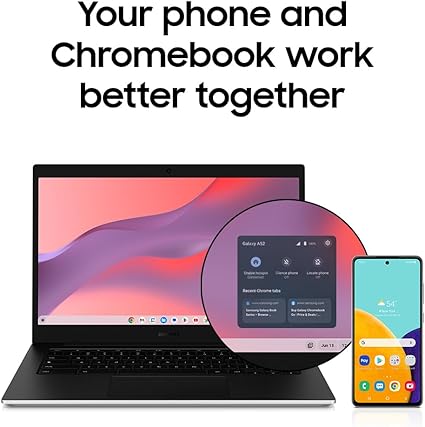
Best Buy “Clearance” vs Amazon: Samsung Galaxy Chromebook Go Price Comparison – Clearance Doesn’t Always Mean Cheap!
I found a Samsung Galaxy Chromebook Go on Best Buy clearance. The price? Higher than Amazon’s regular price. This proves that “clearance” doesn’t always mean “best deal.” Always compare prices before you buy, even when you see a yellow clearance tag.
The Shocking Discovery
I was browsing Best Buy clearance deals looking for laptop bargains. Then I found the Samsung Galaxy Chromebook Go marked as “clearance.” I thought, “Great, this must be the best price!”
Then I checked Amazon. Same laptop. Same specs. Same condition. The Amazon price was LOWER than Best Buy’s “clearance” price.
❌ Clearance doesn’t always mean cheap.
✅ Always compare before you buy.
📊 Samsung Galaxy Chromebook Go: Amazon vs Best Buy
*Same laptop. Same specs. Amazon wins on price.
📸 Product Images

Best Buy (Clearance)

Amazon (Regular Price)
💡 Key Takeaways for Smart Shoppers
- ❌ Clearance doesn’t guarantee the lowest price – Best Buy’s “clearance” price was higher than Amazon’s regular price
- ✅ Always compare across retailers – Amazon, Walmart, Target, and Best Buy can have different prices for the exact same product
- 🔍 Check the specs carefully – Make sure you’re comparing the same model, same storage, same RAM
- 💰 Don’t assume “clearance” means “deal” – Sometimes “clearance” just means “old inventory” not “good price”
- 📱 Use price comparison tools – A quick search can save you $50-100 on a laptop
Check Best Buy Clearence Sale Price!!!
Check Regular price on Amazon !!
Samsung Galaxy Chromebook Go – Key Features
- 💻 Slim and lightweight design – perfect for students
- 🛡️ Military-grade toughness – survives drops and dings
- 🔋 12-hour battery life – all-day power
- 📶 3x faster Wi-Fi than previous generation
- 📱 Phone and Chromebook work seamlessly together
- 🎒 Great for school, travel, and everyday use
- 🐢 Celeron processor – not for heavy multitasking
- 💾 4GB RAM – entry-level performance
- 📦 64GB storage – limited for offline files
- 🖥️ ChromeOS only – not Windows
- 🎮 Not for gaming or video editing
📋 The Bottom Line: The Samsung Galaxy Chromebook Go is an excellent student laptop or budget travel companion. It’s durable, has great battery life, and is perfect for web browsing, schoolwork, and streaming. Just don’t expect it to replace a high-performance Windows laptop.
🎯 Who Should Buy the Samsung Galaxy Chromebook Go?
Students
Perfect for online classes, research papers, and streaming lectures. The durable build survives backpack life.
Travelers
Lightweight, long battery life, and ChromeOS simplicity makes it ideal for trips.
Senior Citizens
ChromeOS is simple and hard to break. Great for email, video calls, and web browsing.
❓ Frequently Asked Questions
💰 Is Amazon always cheaper than Best Buy clearance?
No, but in this case it was. Always compare prices before buying. Clearance doesn’t guarantee the lowest price.
🔋 How long does the battery last?
Up to 12 hours on a full charge, according to Samsung. That’s a full school day or a cross-country flight.
📦 Can I upgrade the storage?
The 64GB storage is eMMC (not user-upgradeable). Use cloud storage (Google Drive) for additional space.
🎮 Can this laptop handle games?
No – this is not a gaming laptop. It’s designed for web browsing, schoolwork, and streaming.
🏆 Final Verdict
Winner: Amazon
Same laptop. Lower price. No “clearance” markup. Amazon wins this comparison.
Lesson Learned
Clearance doesn’t always mean cheap. Always compare prices across retailers before buying.
🛒 Shop Samsung Galaxy Chromebook Go
*Amazon price is currently lower than Best Buy clearance. Always compare before buying!

📊 Lenovo Chromebook: Amazon vs Best Buy – Specs Don’t Lie
*Same processor, same RAM, same screen. Amazon wins on faster storage AND a more versatile 2-in-1 design.
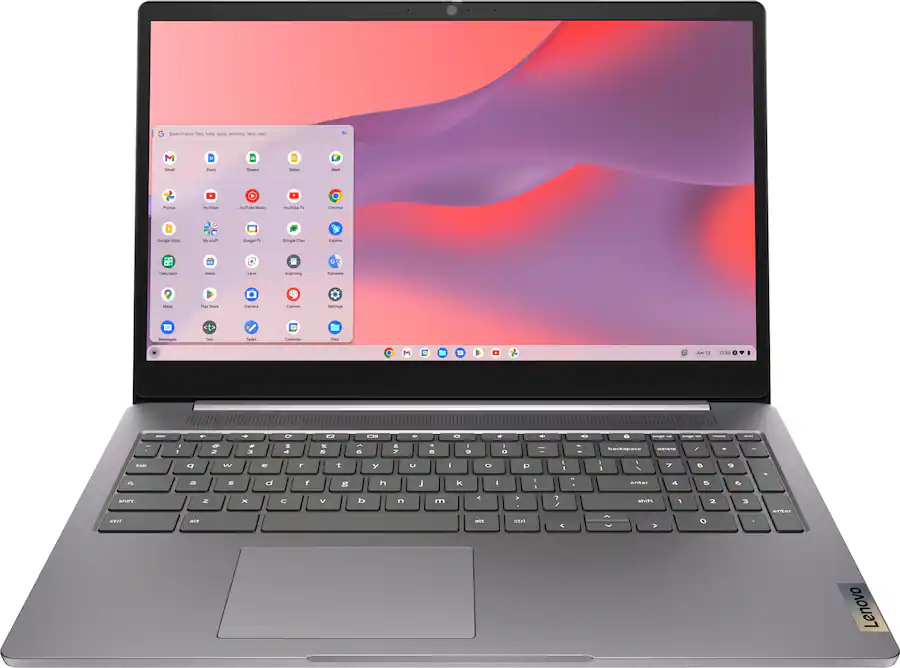
📊 Full Comparison: Amazon Chromebook vs Walmart Windows Laptop
| Feature | Amazon (IdeaPad Flex 3i Chromebook) | Walmart (IdeaPad 3i Windows Laptop) | Winner |
|---|---|---|---|
| Price | ~$190-200 | $449.00 | Amazon (cheaper) |
| Operating System | Chrome OS | Windows 11 Pro | Walmart (full Windows) |
| Processor | Intel Pentium N6000 | Intel Core i3-1115G4 | Walmart (much faster) |
| RAM | 8GB | 8GB | Tie |
| Storage | 128GB SSD | 512GB PCIe SSD | Walmart (4x more) |
| Screen | 15.6″ FHD Touch | 15.6″ FHD Touch | Tie |
| Form Factor | 2-in-1 (Flex) | Standard laptop | Amazon (more versatile) |
| Backlit Keyboard | ? | ❌ No | Tie |
| Ports | Limited | USB-A, USB-C, HDMI, Card Reader | Walmart (more ports) |
| Weight | ~3.5 lbs | 3.64 lbs | Tie |
| Best For | Students, web browsing | Business, professionals, multitasking | Walmart (more capable |
💡 Key Takeaways
1. Different Tools for Different Jobs
| If you need… | Choose… |
|---|---|
| Cheapest option for basic tasks | Amazon Chromebook (~$190) |
| Full Windows software compatibility | Walmart Windows Laptop ($449) |
| 2-in-1 tablet flexibility | Amazon Chromebook |
| Fast performance + lots of storage | Walmart Laptop (512GB SSD) |
| Business use (Windows 11 Pro) | Walmart Laptop |
| Budget student laptop | Amazon Chromebook |
prices subject to change
The Price Difference Makes Sense
The Walmart laptop costs ~$250 more than the Amazon Chromebook. For that extra money, you get:
| What You Gain | Value |
|---|---|
| Windows 11 Pro (vs Chrome OS) | Professional software compatibility |
| Much faster Intel Core i3 processor | Better multitasking |
| 4x more storage (512GB vs 128GB) | Room for files, apps, games |
| More ports (HDMI, card reader) | Connect to monitors, cameras |
3. Clearance Status
At $449, this Walmart laptop is priced competitively for its specs.

🎯 Which One Should Your Readers Buy?
Choose the Amazon Chromebook ($190) if:
- ✅ You only need web browsing, email, Google Docs
- ✅ You want a 2-in-1 tablet/laptop hybrid
- ✅ Budget is the #1 priority
- ✅ You’re buying for a student or child
Choose the Walmart Windows Laptop ($449) if:
- ✅ You need full Windows software (Microsoft Office, QuickBooks, etc.)
- ✅ You need 512GB storage for files, photos, videos
- ✅ You want faster performance for multitasking
- ✅ You’re using it for business or work-from-home
- ✅ You need HDMI port to connect to monitors
📊 Amazon Chromebook vs Walmart Windows Laptop: Which Should You Buy?
*Amazon Chromebook wins on price and 2-in-1 flexibility. Walmart laptop wins on power, storage, and Windows software compatibility.
🏆 Final Verdict: Which Laptop Should You Buy?
Buy the Amazon Chromebook if:
✅ You need a budget laptop under $200
✅ You only need web browsing and Google apps
✅ A 2-in-1 tablet mode is important
✅ Buying for a student or child
Buy the Walmart Windows Laptop if:
✅ You need full Windows software
✅ You need 512GB storage for files
✅ You multitask heavily
✅ Using it for business or work-from-home
✅ You have a $450 budget
📝 Key Message
Clearance doesn’t mean “best deal” – but it doesn’t mean “bad deal” either.
The Walmart laptop costs more because it’s a much more capable machine. Windows 11 Pro, a faster Intel Core i3 processor, and 512GB of storage make it a better choice for business users and professionals.
The Amazon Chromebook is perfect for students or anyone on a tight budget who only needs basic web browsing.
Bottom line: Buy what fits your needs and budget – not just what’s on clearance.
🔗 Affiliate Disclosure: This post contains affiliate links. If you purchase through these links, I may earn a small commission at no extra cost to you. Thank you for supporting ConfidenceBuildings.com!
© 2026 ConfidenceBuildings.com | Laxmi Hegde, MBA in Finance
📊 Enjoyed this comparison? See all my price & feature comparisons in one place → Visit the Comparison Hub
“Want to see a specific product compared? Send me a message and I’ll add it to the list.”

Support Future Uploads
If you found this comparison helpful, consider buying me a coffee. Your support helps me create more in‑depth comparisons.
☕ Buy Me a Coffee
paypal.me/LaxmiHegde
Leave a Reply